Skip to content
Grav 2.0 is officially stable. Read the announcement →

Community guidelines

Please keep discussions civil and on-topic. Repeated violations may lead to a temporary ban.

Support

Access blog children items from other page urls

Started by DrPen 3 years ago · 3 replies · 426 views
3 years ago

I might be missing something basic, Im new to Grav and not a great coder. Im trying to create a simple site with a few 'stand alone' pages (about me, resume, whatever) and a blog with several top level categories and multiple tags. Ive made a sidebar with tags and categories that works with blog as parent page url, but Id like the sidebar blog categories or tags to be accessible if the user is currently viewing any other page url, for example, they might be on the resume page, but then want to click on blog category 'Technical' -
'... //mysite.com/resume/blog/category:technical'
or just while being on the resume page clicking and getting the usual //mysite.com/blog/category:technical' slug. Or even access categories or tags without 'blog' in the slug at all (though that is less logical imo).

Im using an inherited theme from 'Striped' and everything else works fine. The sidebar twig template partial for categories is currently -

TWIG
{% set taxlist = taxonomylist.get() %}

<ul class="categories">
        {% for tax,value in taxlist['category'] %}
        <li> <a href="{{ base_url }}/category{{ config.system.param_sep }}{{ tax|e('url') }}">{{ tax}}</a></li>
        {% endfor %}
</ul>

And the sidebar is

TWIG
{% if config.plugins.taxonomylist.enabled %}
<section class="box recent-comments">
 <header>
        <h2>Categories</h2>
    </header>
    {% include 'partials/taxonomylist_category.html.twig' with {'taxonomy':'category'} %}
</section>
 {% endif %}

Ive tried looking in url taxonomy filters, routing, site.yaml config and other info on page collections but I can't seem to understand how to do this.
last edited 02/02/23 by DrPen
3 years ago

1st part, look at Quark them: blog.html.twig, blog-bits.yaml, sidebar.html.twig#L2, sidebar.html.twig#L27 and taxonomylist.html.twig (also can be improved)
in short you must reset base_url and when include taxonomylist.html.twig partial use with tag.

For 2nd,

@penworks:
Or even access categories or tags without ‘blog’ in the slug at all

@penworks you can create a template for the category itself instead of using taxonomy filter, look at Knowledge Base theme category template as a possible base.

last edited 02/02/23 by Vadym
3 years ago

@b.da Thanks for quick response and such helpful template examples. If its possible to create separate templates for categories (and tags?) then that might in fact be the best solution as these could then be shared by different collections (eg blog, galleries etc) and have a logical url like 'galleries/category:some_page' and breadcrumb. Ill investigate.

3 years ago

Update, for possible benefit to other readers who are new to Grav and want to do something similar to this.

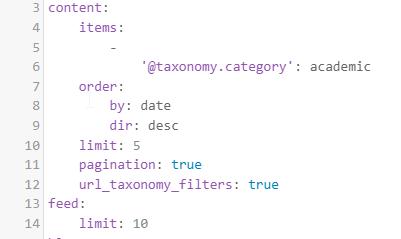
I haven't been able to change the base url from default pages to enable access to categories or tags from the taxonomy list in the sidebar, after trying various code configurations. Some of this might be caused by a) not understanding how blueprint partials work in an inherited theme, or b) this having no effect on default pages, only blog pages. I was able to configure blog template pages to access all items from any parent collection from the sidebar by using the blog_url defined as '/blog' in the md header. But, Im running out of time that I can give to this atm. So to speed up a live site for the time being, I have decided to do (potentially) quick/dirty solutions for what I need. Ive used the taxonomy page collection option, for example '@taxonomy.category': academic' and make several other blog pages, one for each category, configured this way. This works, adds those pages for each category to the main nav and those categories access any parent collection, depending only on category. This solves the issue of when the user is on a default page to be able to access category content easily from the sidebar with a logical url path and working breadcrumb. Im also using taxonomy_filters set to true, but dont know if this is having any effect (or needed).

2023-02-05 08_07_09-Academic ( _academic ) _ penworks.net|401x239

This is as far as Ive got and I know its probably not what should be done but Im doing it, until I have more time to learn how data calls are done in Grav. Visually, code and variables etc look very similar to ExpressionEngine, but obv are not the same.

last edited 02/05/23 by DrPen

Suggested topics

Topic Participants Replies Views Activity
Support · by Thomas, 1 week ago
2 51 8 hours ago
Support · by Anna, 2 days ago
2 58 10 hours ago
Support · by Justin Young, 11 hours ago
1 30 11 hours ago
Support · by Duc , 1 week ago
2 63 5 days ago
Support · by Colin Hume, 1 week ago
2 55 5 days ago