What do I need to add so that "content type" is reported for webp images? I'm trying to optimize my website, and seobility.net reports that I could improve things with the correct content type.
Thanks,
J

Solved by pamtbaau View solution
What do I need to add so that "content type" is reported for webp images? I'm trying to optimize my website, and seobility.net reports that I could improve things with the correct content type.
Thanks,
J
@unleashed, I can reproduce the issue and have logged an issue at Grav's repo.
Thanks for opening the issue. Does this mean it requires something in the core? I was hoping it would be a simple twig addition.
@unleashed, Infra is not really my forte, but here are my 2 cents...
Twig will only generate the HTML which contains the references to css/js en img files. These files are all loaded separately while/after the HTML is being rendered by the browser.
When fetching the images, Grav is not involved, only Apache is. If you switch on the PHP debugger and set a breakpoint in index.php, you will notice that Grav is only started when the page is being requested, not when images are being requested.
For example, in HTML you may find <img src="/user/pages/02.typography/image.webp" >. When you request that image's url in a new tab like https://mydomain/user/pages/02.typography/image.webp, you'll notice that Grav is not being started.
So, I don't think it is the core of Grav that needs to be changed, but Apache or .htaccess.
In .htaccess you could add:
AddType image/webp ".webp"
Or in Apache's config file for your site, you could add:
<Directory /var/www/html>
   AddType image/webp ".webp"
</Directory>
Ouch. So this affects everyone that doesn't tweak their .htaaccess or Apache? For as long as webp has been around, I would have thought those types of issues would have been solved. Or maybe I"ll reach out to my hosting provider.
Thanks for the info.
@unleashed, I've never heard about this issue before, probably because... it isn't that much of a problem. Sites are working just fine...
What's funny, I gradually updated all of my images to webp over the last couple of months because almost every SEO optimizer indicated it would improve page load for mobile devices. Improve speed, improve search results, right? Nope.
Since then, I've lost traffic. What also sucks is I monkeyed the transition from Google UA to GA4 and lost my history. I was hoping something like this would return my traffic to normal.
yay.technology...
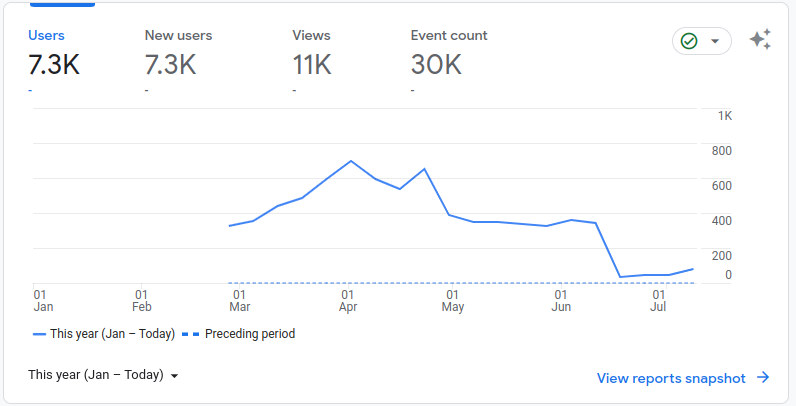
Cheers, all it took was an update to the .htaccess. Thanks for pointing me in the right direction. I added this AddType image/webp .webp to the end of the file, and here's the results:

Thanks again,
J
@unleashed, It is not very likely that your pageviews have dropped that dramatically (> -80%) solely by migrating to webp and the issue with Content-Type.
Log in to reply.
| Topic | Participants | Replies | Views | Activity |
|---|---|---|---|---|
| 6 | 139 | 16 hours ago | ||
| 2 | 100 | 2 days ago | ||
| 0 | 51 | 3 days ago | ||
| 2 | 92 | 3 days ago | ||
| 1 | 143 | 4 days ago |