Skip to content
Grav 2.0 is officially stable. Read the announcement →
Support

Edit info displayed on blog page with Antimatter

Started by anarchocat 2 years ago · 5 replies · 162 views
2 years ago

I'm trying to find how I can edit the info displayed on the blog page (i.e. the page where all the articles are listed). More precisely, I'm trying to remove the title of the article from this page. I'm using the Antimatter theme

For instance, right now, I have the following info displayed :

TXT
Page title
Image (header)
Article title 
Part of the text
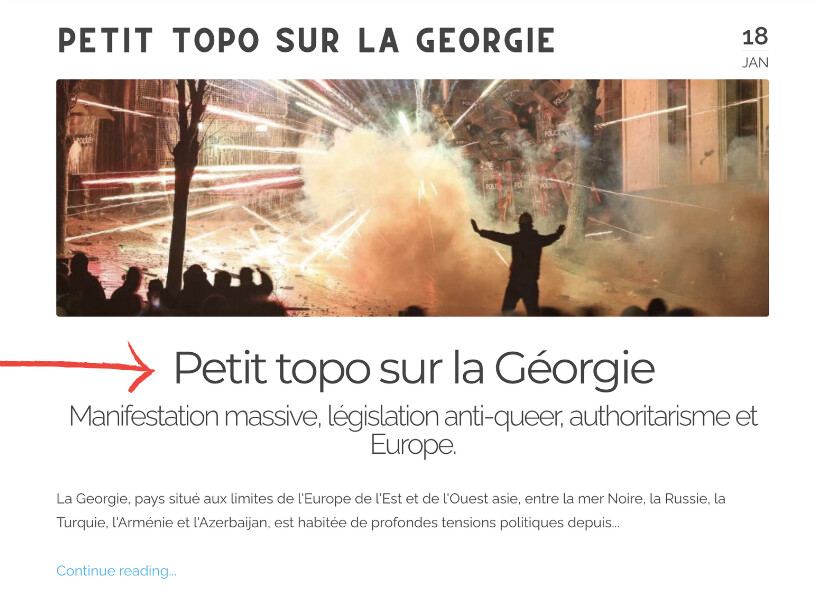
image|662x500

My question is : Is it possible to remove the article title from this page while keeping the title once you access the article ?

last edited 01/18/25 by anarchocat
2 years ago

I'm using Antimatter. I edited the post. Sorry for that :)

2 years ago

Based on the code, it seems like all this text comes either from your page.summary or page.content (lines 53-62)

2 years ago

Thanks ! I can confirm that it's where the modification should be done. However, I didn't find how to remove the title part. I'm not sure how the page.x works. I also tried a work around by modifying the custom.css file with the following lines:

CSS
.p-summary h1 {
    display: none;
}

But for some reason, the custom.css file doesn't seem to do anything for this. I'll write a post for that.

2 years ago

How does your MD file look like? I'm pretty sure you have a title directly in your content

Suggested topics

Topic Participants Replies Views Activity
Support · by Anna, 21 hours ago
2 67 24 minutes ago
Support · by gtx, 1 week ago
4 233 2 days ago
Support · by Paul Hodges, 2 weeks ago
13 283 5 days ago
Support · by Anna, 3 weeks ago
9 339 1 week ago
Support · by TomW, 2 weeks ago
4 192 2 weeks ago