Skip to content
Grav 2.0 is officially stable. Read the announcement →

Community guidelines

Please keep discussions civil and on-topic. Repeated violations may lead to a temporary ban.

Support

External link in header menu? (Antimatter)

Solved by pamtbaau View solution

Started by werdi 6 years ago · 4 replies · 2493 views
6 years ago

Can anyone let me know how I would include an external link into the header menu of my site? Would I modify the base.html.twig file? If so, how?

Thanks!

<br/>

TWIG
<body id="top" class="{{ page.header.body_classes ?: 'header-image fullwidth' }}">
<div id="sb-site">

          {% if not page.header.hide_header %}
     {% block header %}
     <header id="header">
         <div id="logo">
             <h3><a href="{{ base_url == '' ? '/' : base_url }}"><img src="/user/img/MariaBusqueLogo2.png"/></a></h3>
         </div>
         <div id="navbar">
             {% block header_extra %}{% endblock %}
             {% if not page.header.hide_navigation %}
             {% block header_navigation %}
             {% include 'partials/navigation.html.twig' %}
             {% endblock %}
             {% endif %}
             <span class="panel-activation sb-toggle-left navbar-left menu-btn fa fa-bars"></span>
         </div>
     </header>
     {% endblock %}
     {% endif %}

    {% if not page.header.hide_langswitcher|defined(false) %}
        {% if config.plugins.langswitcher.enabled  %}
        {% include 'partials/langswitcher.html.twig' %}
        {% endif %}
    {% endif %}

    {% block showcase %}{% endblock %}
👍 1
6 years ago

@werdi, Have you tried the directions for adding custom menu items from the README?

By default, Grav generates the menu from the page structure. However, there are times when you may want to add custom menu items to the end of the menu. This is now supported in Antimatter by creating a menu list in your site.yaml file. An example of this is as follows:

YAML
menu:
- text: Source
url: https://github.com/getgrav/grav
- icon: twitter
url: http://twitter.com/getgrav

In templates/partials/navigation.html.twig you will find the following snippet that adds the (external) links to the menu.

Starting at line 40:

TWIG
{% for mitem in site.menu %}
  <li>
    <a href="{{ mitem.url }}">
      {% if mitem.icon %}<i class="fa fa-{{ mitem.icon }}"></i>{% endif %}
      {{ mitem.text }}
    </a>
  </li>
{% endfor %}
👍 2
last edited 08/27/20 by pamtbaau
6 years ago Solution

@werdi. And to add even more alternatives...

Alternative 3:

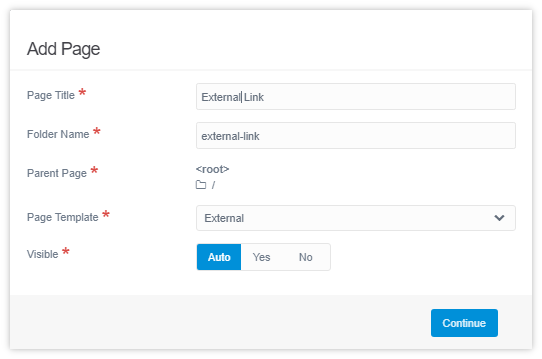
  • In Admin, create a new page.
  • In the modal popup, set the template to 'External'
    image|542x359
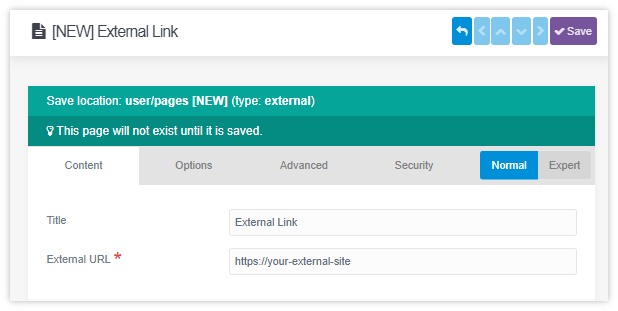
  • Then in the next page, add the url to the external site:
    image|618x311

Alternative 4:
Of course, knowing Grav, you could also create page 'external.md' manually and add the following config in the header:

YAML
---
title: 'External Link'
external_url: 'https://your-external-site'
---

So, you have 4 alternatives now... Surely one of these should fit your needs ;-)

👍 3
last edited 08/27/20 by pamtbaau
6 years ago

Thank you @pamtbaau and @paulhibbitts for your support! I chose the 3rd option. Thanks for taking the time to reply.

👍 1

Suggested topics

Topic Participants Replies Views Activity
Support · by Thomas, 1 week ago
2 60 16 hours ago
Support · by Anna, 3 days ago
2 66 19 hours ago
Support · by Justin Young, 20 hours ago
1 34 20 hours ago
Support · by Duc , 1 week ago
2 70 6 days ago
Support · by Colin Hume, 1 week ago
2 61 6 days ago