Skip to content
Grav 2.0 is officially stable. Read the announcement →

Community guidelines

Please keep discussions civil and on-topic. Repeated violations may lead to a temporary ban.

Support

Grav scheduler is not working

Started by alex_u13 4 years ago · 1 replies · 583 views
4 years ago

Hello everyone The scheduler does not work on my site.

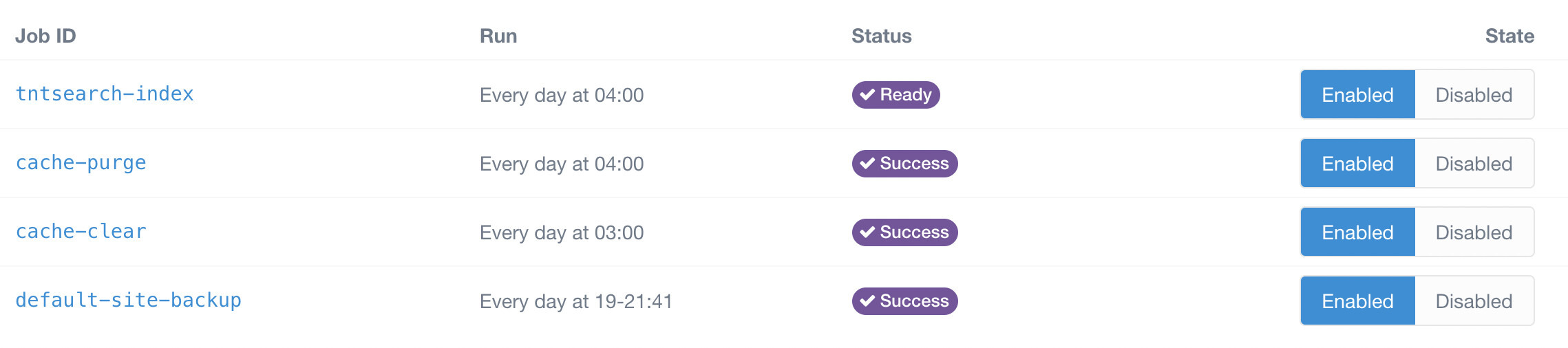
On the web I have this picture:
image|690x153

In the console so:

JS
user@server:/root_directory $ php8.0 bin/grav scheduler -d

Job Details
===========

┌─────────────────────┬──────────────────┬──────────────────┬────────┐
Job IDLast RunNext RunErrors├─────────────────────┼──────────────────┼──────────────────┼────────┤
default-site-backup2020-12-19 03:002022-01-27 20:06None└─────────────────────┴──────────────────┴──────────────────┴────────┘

And in the files so:

YAML
user@server:/root_directory $ cat user/config/scheduler.yaml
status:
cache-purge: enabled
cache-clear: enabled
default-site-backup: enabled

The crown works correctly:

TXT
user@server:/root_directory $ tail -1 /var/log/cron.log

Jan 27 20:26:01 server CRON[01]: (www-data) CMD (cd /root_directory;/usr/bin/php8.0 bin/grav scheduler >> /dev/null 2>&1)

The command is also executed correctly, which means the problem is on the Grav side.

Please tell me where to dig

4 years ago

There are two reasons coming to my mind that can cause this issue:

  1. I am citing the documentation on this: "You need to be logged in to the shell with the same user as your webserver. This is to ensure that the user that runs the schdeduler commands matches the webserver user that needs to interact with those files. If you install the crontab entry with another user (e.g. root ) any files created will be created as that root user and not the webserver user which can lead to problems." (see https://learn.getgrav.org/17/advanced/scheduler#installation)
  2. There is a configuration "gotcha", that I run into myself several times. You can configure grav based on the url it is accessed. That means your website is reachable calling example.com, all configuration is tied to this url. The cron job on the other side uses localhost when calling the scheduler job, so the configuration bound to example.com will not apply! (see https://learn.getgrav.org/17/advanced/environment-config#automatic-environment-con)

Suggested topics

Topic Participants Replies Views Activity
Support · by Thomas, 1 week ago
2 54 12 hours ago
Support · by Anna, 3 days ago
2 60 15 hours ago
Support · by Justin Young, 16 hours ago
1 30 15 hours ago
Support · by Duc , 1 week ago
2 65 5 days ago
Support · by Colin Hume, 1 week ago
2 57 5 days ago