Skip to content
Grav 2.0 is officially stable. Read the announcement →

Community guidelines

Please keep discussions civil and on-topic. Repeated violations may lead to a temporary ban.

Support

How to publish a pdf A4page?

Started by Veehem 3 years ago · 7 replies · 678 views
3 years ago

(Sorry, I've tried to find the solution on the forum but a similar question didn't get any answer)
I didn't find how to publish a full pdf A4page (as I can do with a jpg file)

And btw, I'm using Qwark, maybe there is an other theme with a more explicit Admin panel ? This one is quiet complicated for a new Grav user

3 years ago

@veehem,

how to publish a full pdf A4page (as I can do with a jpg file)

Try plugin https://github.com/getgrav/grav-plugin-shortcode-media

To show pdf /pages/02.typography/yourpdf.pdf you can use the following in the content of /pages/02.typography/default.md:

TXT
[pdf url="yourpdf.pdf" /]

maybe there is an other theme with a more explicit Admin panel

Admin is a generic plugin and equal to all themes. However, themes and plugins can add extra functionality to Admin.

3 years ago

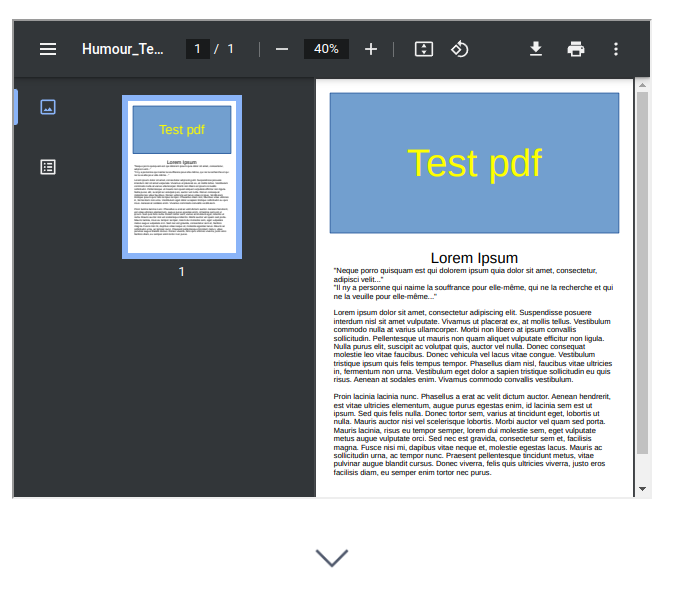
@pamtbaau Thank you. It's working but I don't have the pdf as a full image/page
image|573x500
How can I solve it ?

3 years ago

@veehem,

but I don’t have the pdf as a full image/page

Not sure what a "full image/page" means. How should the page look like?

You could play around with:

last edited 12/11/23 by pamtbaau
3 years ago

Thanks @pamtbaau and sorry for all those questions, maybe there are an example page somewhere. I've read the Github page but all may try are not working e.a.

[pdf url="my.pdf" width="100%" height="100%" /]
Or
[pdf url="my.pdf" width="600" height="800" /]

I only want that the pdf appear like a A4 image

3 years ago

@veehem,

I only want that the pdf appear like a A4 image

That might sound clear to you, but I still don't know... Do you have a sample to show?

As a quick solution, try my third suggestion by adding the following to the content of /pages/02.typography/default.md

TXT
[Open PDF in fullscreen](yourpdf.pdf)

Of course, the file yourpdf.pdf should be in the folder /pages/02.typography/. You are free to store the pdf in any other location, but you will have to adapt the url in that case.

Note: Above option does not require the above mentioned plugin.

last edited 12/11/23 by pamtbaau
3 years ago

No @pamtbaau it's not working. It just give a link or open the pdf in an other window or save it (depend of the browser settings).
Thanks for your help. Maybe someone else has the solution. Or I'll maybe find it and put the subject as solved. Let's hope...

3 years ago

I was going to suggest use the PDF-JS plugin
which allows you to embed a pdf via a shortcode and you can set windows size and width as you want.
e.g. https://hazardex.com/reference/eps-guide
What is now of concern is it appears to be no longer available
Suggested topics

Topic Participants Replies Views Activity
Support · by Thomas, 1 week ago
2 51 8 hours ago
Support · by Anna, 2 days ago
2 58 10 hours ago
Support · by Justin Young, 11 hours ago
1 30 11 hours ago
Support · by Duc , 1 week ago
2 63 5 days ago
Support · by Colin Hume, 1 week ago
2 55 5 days ago