I have a site that is powered with Grav. I made a new, simple webpage that is not associated with Grav, it's a very simple page that did not need to be associated with the rest of my website. I put the new page in a subfolder in my root directory. When I surf there, it works fine, but the images do not load. I think Grav is somehow preventing them from loading. When I surf to the URL that is specifically for the image file, I get my Page Does Not Exist message from Grav. How can I prevent this?
Solved by Dennis View solution
It would be easier to debug if you gave us the address, or at least some more details about where are the images located, and do you use relative or full URLs in your page 🙂
The section with id="proof" has a background image. There absolutely is an image that resides at the URL, but it's not being displayed.
Did you try to put absolute path? RN it's looking for image in /grav/user/pages/proof/img/tees/filename.jpg
You sure that is the correct path?
It's looking for the image here:
http://asbvaldosta.com/proof/img/tees/2000_white_front.jpg
I don't see the path you are describing.

Grav is taking over and saying there is no image there. There absolutely is an image there.
last edited 04/28/20 by Dennis
@dennis, I did the following:
- Created a fresh install of Grav 1.6.23 in my localhost
- Created folder '/proof' in root of Grav folder
- Copied html content of http://asbvaldosta.com/proof, styles.css and scripts.js into my local files.
- Added a dummy image and renamed it '2000_white_font.jpg'
- Folder structure is now:
TXT
./proof ├── css │ └── styles.css ├── img │ └── tees │ └── 2000_white_front.jpg ├── index.html └── js └── scripts.js - Browsed to http://localhost/grav/site-dev/proof/
- Result:
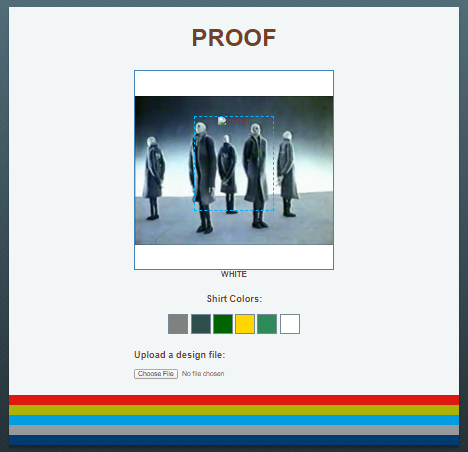
If this is not what you wanted to see, what is?
You didn't have to go through that trouble, but it is definitely appreciated! It helped me know that the problem was just something I was overlooking. I was assuming there was some characteristic of Grav that was hijacking the URL. How? I dunno.
I was able to track down the issue! It's case sensitivity! My image file names have capital letters in them. There is no problem when running on my local host, but when I visit the page live on the remote server, case makes a difference.
Again, thanks for the response!
Log in to reply.
Suggested topics
| Topic | Participants | Replies | Views | Activity |
|---|---|---|---|---|
| 1 | 65 | 48 minutes ago | ||
| 6 | 156 | 1 day ago | ||
| 2 | 114 | 3 days ago | ||
| 2 | 100 | 4 days ago | ||
| 1 | 151 | 4 days ago |