I'm in over my head here... so use laymen's terms in any replies. Don't assume I know coding.. I have this javascript that scans the page, and if a Bible verse is used, it will recognize the reference, and activate it as a 'mouse over' object. When the mouse moves over it, it pops up the Bible verse. It works great in straight-up html. It doesn't work when implemented in Grav. I'm calling the javascript with twig with this line:
{% do assets.addJs('/user/pages/popverse/popverse.js') %}
Here is the GravSite test.

Here is the very basic html working.
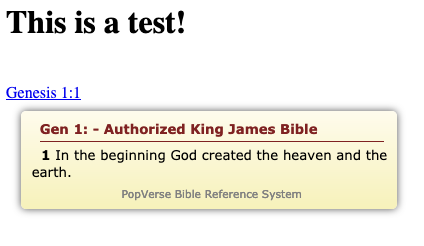
Any help, or pointers would be appreciated.
Solved by Shane View solution
this looks like your js file is not found.
you could try the following:
- put your popverse.js file in your theme's js folder
- use
{% do assets.addJs(’theme://js/popverse.js’) %}
in your twig file
Actually, the javascript is loading, because otherwise the verse reference wouldn't be highlighted, and when the mouse would move over it, nothing would happen. So, that tells me the js is working. The whole folder has a js, php, html, and css file that it is referencing. The js is the only thing called from my line being inserted into twig, and calls the rest. So in my html example, the code is:
HTML
<script scr="/popverse/popverse.js"></script>
So... I'm a little confused. The same thing happens when I try to use the folder and coding on a Wordpress site... it pops up empty.
Thanks for the input.
It looks like maybe the JS is throwing an error when it's trying to retrieve the given text. A quick look at the PopVerse site suggests that everything is hosted locally - have you got all the files in the same folder?
It would be helpful to see any JS errors - could you either link to your site, or copy and paste the errors from the console? (On Chrome go to the 3-dot menu, select More Tools -> Developer Tools when on your page. Mouse over one of the verses and see if any red text errors show up)
If there are no JS errors, it may be that the getBib.php file is not able to get data from the avBib.db, but we'll cross that bridge when we get to it...
Another test - you should be able to go to http://mygravsite.org/popverse/getBib.php?ref=Gen%201:26 and have it return text. If it doesn't then that's probably the issue.
@mrben Thank you!
Folder & Files:
All the files are in the folder, and I just move the entire folder as a unit to keep everything together.
Direct Access:
It took me a couple of clicks to realize, the link I was supposed to change mygravesite.org to the actual domain name. Lol! Coffee hadn't kicked in yet. I'm doing this on local development so nothing is live online. When I tried the direct access, I get a 403, forbidden access error. I tried several ways, and always got a 404, or 403 error.
Developer tools:
However the error from the Developer Tools gives me these two things:
TXT
 Synchronous XMLHttpRequest on the main thread is deprecated because of its detrimental effects to the end user’s experience.
 For more help http://xhr.spec.whatwg.org/
Clicking the arrow down, which I didn't see before, shows it is a permission error, like the direct access.
Request URL:http://localhost/myusername/gravtest/user/themes/learn2-git-sync/popverse/getBib.php?ref=Gen%201:1
Request Method:GET
Remote Address:[::1]:80
Status Code: [403] Forbidden
So it is a permissions problem that I'm running into.
Permissions are set to 755 for the folder and all contents. I'm still getting the same error. This is a permissions problem, allowing javascript and php to be executed in this folder. Apparently I need to set that somewhere in Grav, or put the folder in the right location to allow it to be run. Additionally, I did try to put a .htaccess file in the popverse folder with some simple code:
Header add Access-Control-Allow-Origin "*"
Header add Access-Control-Allow-Headers "origin, x-requested-with, content-type"
Header add Access-Control-Allow-Methods "PUT, GET, POST, DELETE, OPTIONS"
I'm open to suggestions. Seems like we are on the right track. There is something I'm overlooking, or don't know.
Ok, I went ahead and made it live only on this one page:
http://www.biblia.reinavaleragomez.com/genesis/capitulo-1
So you can look at the errors. Also to make sure it wasn't just a problem with my local server.
It definitely appears to be a permissions error. Double check that the owner/group on the getBib.php file (and, while you're there, the .db file) are set to (presumably) www-data so that the webserver is allowed to view them.
You could also (temporarily) set the permissions to 777 (on your local copy if you like) to see if that resolves the issue, to let us know we're on the right track...
ok, on my localhost, I changed all the permissions on the popverse folder and files to 777. This didn't help anything. On my local server, with a overly simplistic html site I created for testing purposes, the popverse works, and the folder has 700 permissions rwx------ is how they are listed on my Mac. So it is not permissions that way, but rather something else in Grav not playing nice.
-
It could be a security thing in Grav limiting where js or php is executed from.
-
It could be a folder structure issue not playing nice with the getBib.php file, because I now have the popverse folder buried down in the Theme directory my structure looks like this:
/user/themes/learn2-git-sync/popverse
However the script is looking for it in www.mygravdomain.com/popverse.
I have a hard time believing that, because when you click the link, it does pull up the html file from the right place, it just isn't accessing the db correctly. So that leads me back to #1.
Either way... I will have to continue to think about this one. I appreciate the input.
By default, the .htaccess that comes with Grav will block direct access to any php files in the user folder.
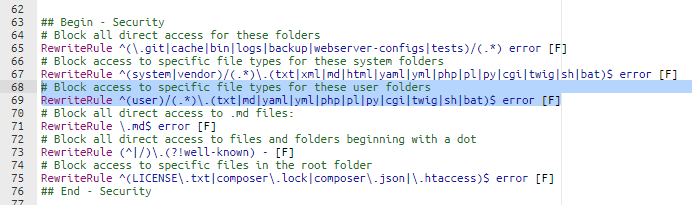
And the popverse.js is accessing the php file getBib.php under your user folder when mouseover event occur.
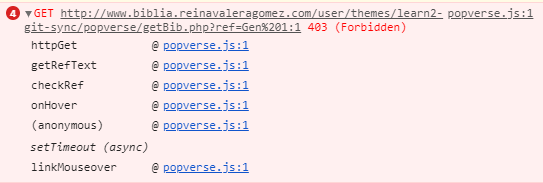
That is exactly what I was looking for. I figured something somewhere was blocking something. Thanks @blacklab! So then the question is now, without commenting out that line in the .htaccess file, how can I make one exception, limited to one folder to run? So security is not totally compromised, just would have an exception. I tried a few... to no avail. Any pointers, or help would greatly be appreciated. Thanks for all the input on this, it has been very helpful.
have you tried an extra .htaccess for your specific folder ?
(should be possible if
AllowOverride All
is set in your global web server config - see this link
@shane, I am quite a noop with respect to php servers and .htaccess etc., so I'm not entirely sure if this is the right approach, but it seems to work for a simple php script...
The following rough example works on my localhost.
Grav root folder:
TXT
assets/
backup/
...
extrafolder/    <-- the new folder
  extra.php
user/
  page/
...
Content of extra.php:
PHP
<?php

echo 'Hello World';
Content of Twig template used for page:
TWIG
{% extends 'partials/base.html.twig' %}

{% block content %}
  <button id="myButton">Click me</button>
  <script>
    $('#myButton').click(function(){
      $.ajax({
        url: "http://localhost/grav/site-dev/extrafolder/extra.php",
      }).done(function(result) {
        alert(result);
      }).fail(function(jqXHR, textStatus, errorThrown) {
        alert(errorThrown);
      });
    });
  </script>
{% endblock %}
The ajax request returns 'Hello World' in above example.
When I move the folder 'extrafolder' below '/user' folder a 'Forbidden' error is returned as expected.
Thanks @hoernerfranz I did try a few different .htaccess files in the popverse folder, but wasn't able to get it to work.
@pamtbaau I think we are on track here! I tried this, and it took me a few tries to get it working, but I got it working on my localhost, but not on the web server... odd. On my server, I now get a 500 error... (Internal Server Error). Surely this is another security roadblock.
Here is the deal with .htaccess files...
They are blocked in Grav with security
Block access to specific files in the root folder
RewriteRule ^(LICENSE.txt|composer.lock|composer.json|.htaccess)$ error [F]
End - Security
Rewrite .htaccess from root folder line 69 from
RewriteRule ^(user)/(.*)\.(txt|md|yaml|yml|php|pl|py|cgi|twig|sh|bat)$ error [F]
to
RewriteRule ^(?!user/themes/learn2-git-sync/popverse/getBib.php)(user)/(.*)\.(txt|md|yaml|yml|php|pl|py|cgi|twig|sh|bat)$ error [F]
The extra code is:
(?!user/themes/learn2-git-sync/popverse/getBib.php)
This will tell Apache to skip the rewrite rule for this specific file.
1 reply
last edited 12/12/19 by Black Lab
@blacklab What will happen with the changes made in .htaccess when Grav is updated?
i guess it may get overwritten if there is changes in .htaccess in the update.
@blacklab Thanks for that line of code! It in fact does sort of work. However I still get an error, it is just a 500 error (Internal Server Error) now instead of the other error I was getting. So while it doesn't let it show the verse, we are making progress. At least I think.
Dealing with a Grav update wouldn't be too bad. I could easily go in and edit the one line.
If you prefer to have a .htaccess in that sub directory, so you don't have to worry about Grav update overwritting the root .htaccess, you can put this:
TXT
RewriteEngine On
RewriteBase /
RewriteCond %{REQUEST_URI} !getBib\.php$ [NC]
RewriteRule ^(.*)\.(txt|md|yaml|yml|php|pl|py|cgi|twig|sh|bat)$ error [F]
For 500 error, generally speaking, you can check PHP error log for more info.
Log in to reply.
Suggested topics
| Topic | Participants | Replies | Views | Activity |
|---|---|---|---|---|
| 1 | 84 | 16 hours ago | ||
| 6 | 165 | 2 days ago | ||
| 2 | 124 | 4 days ago | ||
| 2 | 107 | 5 days ago | ||
| 1 | 158 | 5 days ago |