Skip to content
Grav 2.0 is officially stable. Read the announcement →

Community guidelines

Please keep discussions civil and on-topic. Repeated violations may lead to a temporary ban.

Support

Photoswipe plugin strange behavior

Solved by Junillon View solution

Started by Junillon 4 years ago · 10 replies · 613 views
4 years ago

Hi
I'm trying to use photoswipe plugin and I don't get it right.
I'm making it as simple as the sample but I the swipe does not appear. Instead, when moving the mouse over image, I get a grey bar under the picture.
I think it's a very small stupid thing I do somewhere but I can't find it.
Could somebody help ? (may be @Karmalakas Karmalak ?)
attached the resulting html (you can see the grey stuff) and here is the piece of code :

TWIG
{{ photoswipe('photoswipe-gallery', 'a') }}

<section class="carousel">
    <ul class="carousel-items" id="photoswipe-gallery">
        {% for child in p.collection %}
            {% include 'partials/blog_item.simple.html.twig' with {'refpage':child, 'truncate':true} %}
        {% endfor %}
    </ul>
</section>

And in blog_item.simple.html.twig :

TWIG
<li class="carousel-item" pageref="{{ refpage.url}}" href="{{ refpage.url}}">
    <div class="card">
    <a href="{{ refpage.media.images|first.url}}" data-size="2000x2000" class="gallery-item"> 
    {{ refpage.media.images|first.cropResize(500,350).html(refpage.title ~ " : " ~ html_entity_decode(strip_tags (refpage.content|truncate(150))),refpage.title, 'imgCard img-fluid')}}
    </a>
    </div>
</li>
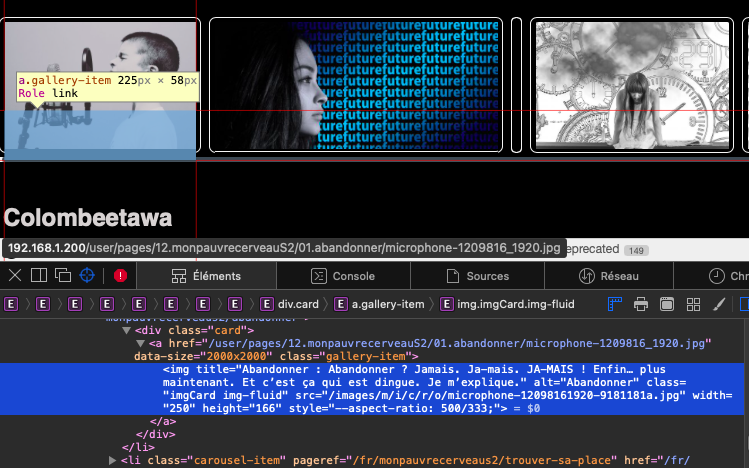
Capture d’écran 2022-01-19 à 15.29.44|690x431

last edited 01/19/22 by pamtbaau
4 years ago

Judging by the card class name I assume you're using Bootstrap. Photoswipe plugin itself doesn't provide any styling for the photo grid you might want to show, so this layout completely is up to you. My guess would be to add display: block; or at least display: inline-block; to .card > a. Still not sure though if it will fix your issue. Quite difficult to understand non-formatted code sample. Please use 3 backticks (```) to wrap code in posts.

Does Photoswipe itself get initialized and work or does it fail? Is there a JS error maybe?

4 years ago

thanks for your answer. So...
This fun theme is made from scratch, so I guess it's based on Bootstrap yes.
PSwipe get initialized yes, I can debug script and everything seems to go well (that's the strange point). Therefore I guess you are right, that must be some css problem.
I tryed to modify "display" but without result.
So, I'm going to dig this way, and come back with the solution ... or not :face_with_raised_eyebrow:

👍 1
4 years ago

I really hope you will figure this out. As I mentioned, photo list/grid/whatever you want is completely up to you how you design and implement it 🙂

BTW, Both opening and closing backticks should be in new line ;)

TXT
```
// code goes here
```
4 years ago

:melting_face: I'm not used to this, sorry ! 😉

4 years ago

Ok, it seems for strange reason (mostly css but not found at this time 🙄) that animation happens at image back. Is it possible ?
I could not identify why it's going like this. I tried to debug your script but without seeing anything.
Still dig it...

4 years ago

What animation? And what is image back? 🤔 Not seeing it live makes it difficult to suggest something

Here's one example with a plain <a/> list
Here's another one with a different approach using <figure/>

Didn't encounter any issues while implementing 🤔

4 years ago

ok ok may be I misexplain. When the mouse is on the image, I can see something happening behind the image, a grey rectangle appears...
I already took some html from your demo site (with figure) without success. I'm sure it's a stupid thing in my code...
(btw the a/> is not doing any swipe ?)

last edited 01/20/22 by Junillon
4 years ago

@Francois:
When the mouse is on the image, I can see something happening behind the image, a grey rectangle appears

Definitely some CSS and :hover case


@Francois:
the a/> is not doing any swipe ?

What do you mean? I just checked and it works fine for me 🤔

4 years ago Solution

my god ! I'm so sorry ! I just found my stupid misunderstood and bad coding.
Of course it was working !
I had just another event captured when mouseclick (result of another dirty coding that should be remove ) resulting in this terrible and strange behavior !
PLease forgive me for that 🥶
Thanks a lot for your time.

Suggested topics

Topic Participants Replies Views Activity
Support · by Thomas, 1 week ago
2 55 12 hours ago
Support · by Anna, 3 days ago
2 60 15 hours ago
Support · by Justin Young, 16 hours ago
1 31 16 hours ago
Support · by Duc , 1 week ago
2 65 5 days ago
Support · by Colin Hume, 1 week ago
2 58 5 days ago