I just started looking at Grav today to see if it could be used for a new project. I am trying to see if I can restrict certain pages based on their group. I have figured out how to require a login to specific pages by adding "access: site.login: true" but it seems that only super users can access them. I have created groups and I would like to be able to restrict pages to only that group but I can't figure out how to do that.
Hi there @paulk! Hope you'll find what you need in Grav 🙂
Page access by group is of course possible, and quite easy to achieve.
As described in the documentation:
- Set the pages access restriction by adding its name (in the below example
special) to the frontmatter:YAMLaccess: site.special: true - Give it to a group of your choosing:
YAML
special: readableName: 'Special users' description: 'The group of premium members' access: site: login: true special: true - Add desired user to this group:
YAML
groups:
  - special
And you should be set to go! 🙂
Thanks so much! That worked!
How about hiding parts of the menu that are only visible when that group has logged in? I found this example for hiding parts of a page: /forum/archive/hiding-parts-of-pages-t5877 but it doesn't mention doing this with the menu:
{% if grav.user.authorize('site.secret') %}
Menu Items
{% endif %}
Ok @MakaryGo so in the Bootstrap theme I found the file user/themes/bootstrap/templates/partials/navigation.html.twig
I added {% if grav.user.authorize('site.affiliates') %} but it just hides the whole menu, so I need to display them based on if the page has access: site.affiliates: true set in the Frontmatter.
TWIG
            <ul class="nav navbar-nav navbar-right">
              {% for page in pages.children.visible %}
                 {% if grav.user.authorize('site.affiliates') %}
                 {% set current_page = (page.active or page.activeChild) ? 'active' : '' %}
                     {% if config.themes.bootstrap.dropdown.enabled and page.children.visible.count > 0 %}
                         <li class="dropdown {{ current_page }}">
                             <a href="#" class="dropdown-toggle" data-toggle="dropdown" role="button" aria-expanded="false">{{ page.menu }} <span class="caret"></span></a>
                             <ul class="dropdown-menu" role="menu">
                                   {% set current_parent = page.active ? 'active' : '' %}
                                   <li class="{{ current_parent }}"><a href="{{ page.url }}">{{ page.menu }}</a></li>
                                   <li class="divider"></li>
                                   {% for child in page.children.visible %}
                                       {% set current_child = (child.active or child.activeChild) ? 'active' : '' %}
                                       <li class="{{ current_child }}"><a href="{{ child.url }}">{{ child.menu }}</a></li>
                                   {% endfor %}
                               </ul>
                           </li>
                       {% else %}
                           <li class="{{ current_page }}"><a href="{{ page.url }}">{{ page.menu }}</a></li>
                       {% endif %}
                   {% endif %}
               {% endfor %}
Thanks for the help.
Okay, what are you trying to achieve? It would be best to see desired result in form of a screenshot, or HTML output perhaps 🙂
Sure. I am trying to create a menu that changes once an "Affilitate" group user is logged in. Menu before login would be: >
"About" "Programming" "Become an Affiliate" "Login"
after login
"About" "Programming" "My Account"
Ok @MakaryGo I have the html output for the menu now:
Before affiliates group user logs in:
HTML
<ul class="nav navbar-nav navbar-right">
  <li class=""><a href="/about">About</a></li>
  <li class=""><a href="/programming">Programming</a></li>
  <li class=""><a href="/become-an-affiliate">Become an Affiliate</a></li>
  <li class=""><a href="/login">Login</a></li>
</ul>
After login:
HTML
<ul class="nav navbar-nav navbar-right">
  <li class=""><a href="/about">About</a></li>
  <li class=""><a href="/programming">Programming</a></li>
  <li class=""><a href="/my-account">My Account</a></li>
</ul>
So, you want to hide just this one link?
There will be more. But basically its show some new links "My Account" etc and hide some links "Become an Affiliate" etc. when a user from that group is logged in.
First thing that comes to mind would be to add custom header to page's frontmatter: https://learn.getgrav.org/content/headers#custom-page-headers and then test against it if user is in the desired group.
I have done that already. That was the part you helped me solve at the beginning of this post. I have added access: site.affiliates: true to the frontmatter of the pages. But if I use this below on the menu:
@paulk:
{% if grav.user.authorize('site.affiliates') %}
It either hides all or shows all. I need a way to check for the page and not the user. Something like:
if grav.page.group('affiliates')
Is there any documentation on Grav's variables like that?
Or if there was a way to only run that if statement on the pages/menu items that I specify because that statement does work.
No, by custom header I mean header defined by you.
You can add any header to any page, just by stating in frontmatter, i.e.:
affiliates_only: true
If you add something like this to all the pages that should be visible to affiliates only, you can then access it in Twig template:
TWIG
{% for page in pages %}
    {% if page.header.affiliates_only %}
    # Does something when it will reach a page that has our custom header set to True
    {% endif %}
{% endfor %}
But of course as we need to check two conditions now, it gets a bit more complicated 🙂
Huh, I just found this topic and it's related Github issue, because it strike me that, well, if you don't have permission required to display page, you shouldn't have access to it's name as well, but I have no clue if it has been implemented since. Maybe @rhuk will know something?
Edition:
If this wasn't implemented, a dirty Twig hack for it would be something like this I think:
TWIG
{% if grav.user.authorize('site.affiliates') or (not grav.user.authorize('site.affiliates') and not page.header.access[''site.affiliates]) %}

<li class="{{ current_page }}"><a href="{{ page.url }}">{{ page.menu }}</a></li>

{% endif %}
If I haven't mess this up, it should translate to:
If current user has
site.affiliatespermission, or page does not havesite.affiliatescondition set up, then display link to this page in menu.
Sorry it took so long, but I had to draw it on paper sheet to get a grip ;)
last edited 11/22/17 by Makary
So, this topic was about front-end display content, not back-end (admin) gui ? Am searching a way to restrict users of "editors" group to some pages... or pages with categories ..
This topic is very instructive, thanks !
... EDIT: and I found out :
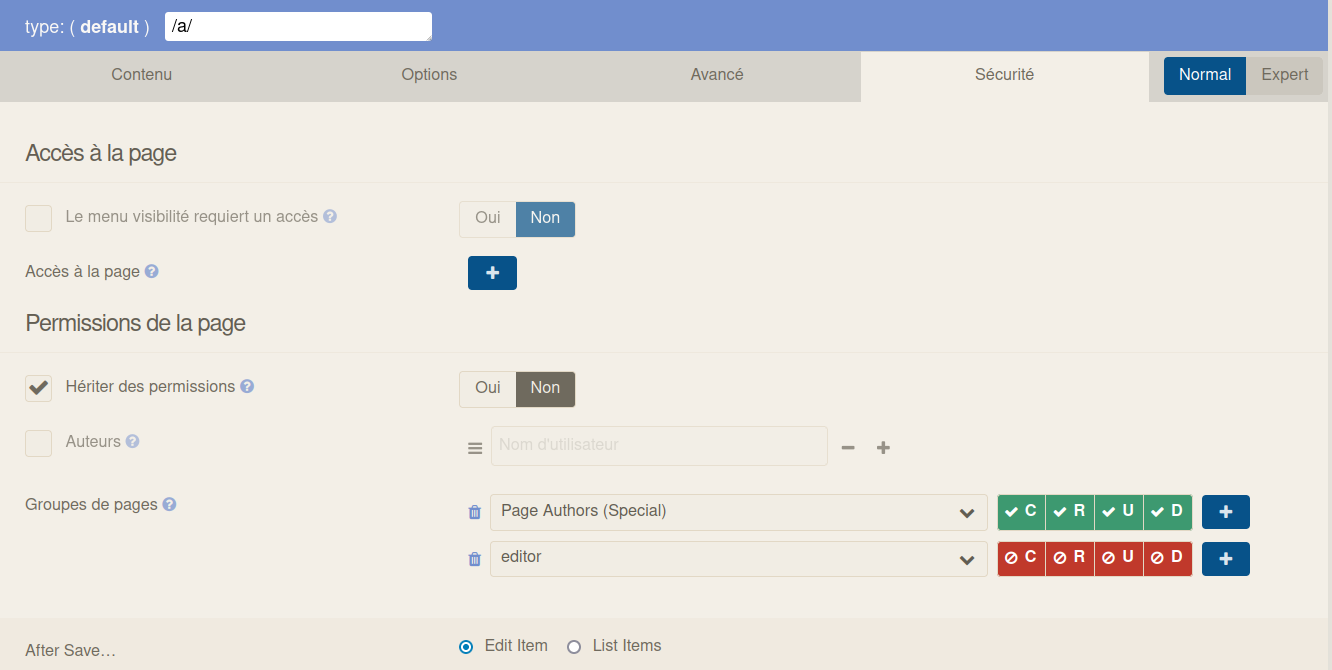
last edited 04/28/24 by Bonnefille
Log in to reply.
Suggested topics
| Topic | Participants | Replies | Views | Activity |
|---|---|---|---|---|
| 6 | 140 | 18 hours ago | ||
| 2 | 100 | 3 days ago | ||
| 0 | 52 | 3 days ago | ||
| 2 | 93 | 3 days ago | ||
| 1 | 143 | 4 days ago |