Hi. Please help to understand.
In the site menu there is a separator item, when you hover on it opens drop-down menus.
But, the separator item refers to the page. If you click on this item you will see a page without content.
How to make this item a separator without a link to page
Where to read about it?
Thanks so much!
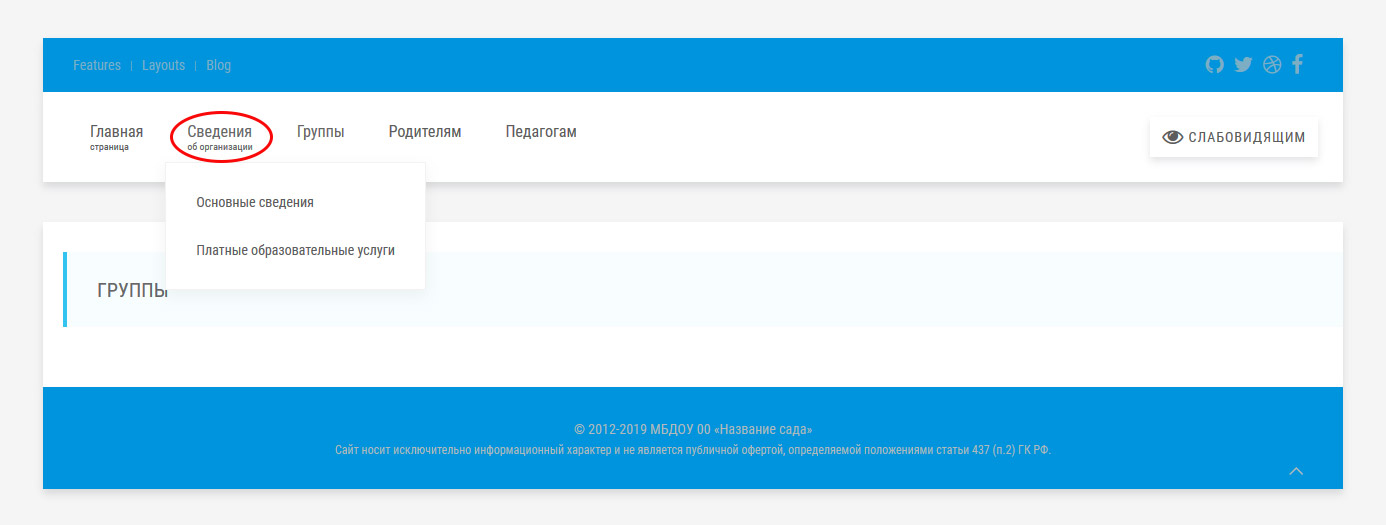
The code that works in the menu
TWIG
{% macro loop(page) %}
{% for p in page.children.visible %}
{% set current_page = (p.active or p.activeChild) ? 'uk-active' : '' %}
{% if p.children.visible.count > 0 %}
    <li class="uk-parent {{ current_page }}" data-uk-dropdown="" aria-haspopup="true" aria-expanded="false">
        <a class="uk-navbar-nav-subtitle" href="{{ p.url }}">{{ p.menu }}</a>
    <div class="uk-dropdown uk-dropdown-small uk-dropdown-bottom uk-dropdown-width-1">
        <div class="uk-grid uk-dropdown-grid">
            <div class="uk-width-1-1">
                <ul class="uk-nav uk-nav-navbar">
                {{ _self.loop(p) }}
                </ul>
            </div>
        </div>
    </div>
    </li>
{% else %}
    <li class="{{ current_page }}">
        <a class="uk-navbar-nav-subtitle" href="{{ p.url }}">
            {{ p.menu }}
        </a>
    </li>
{% endif %}
{% endfor %}
{% endmacro %}

<ul class="uk-navbar-nav uk-visible-large">
{{ _self.loop(pages) }}
</ul>
last edited 01/30/19 by Mark