I am writing my first TWIG. My first very simple lines manage to get the first image from the page. But the rendered HTML spits out the whole image tag instead of displaying the image. See picture of page and twig and output. It did find the correct image.
I also tried {{ image.url }}
Thanks
Norma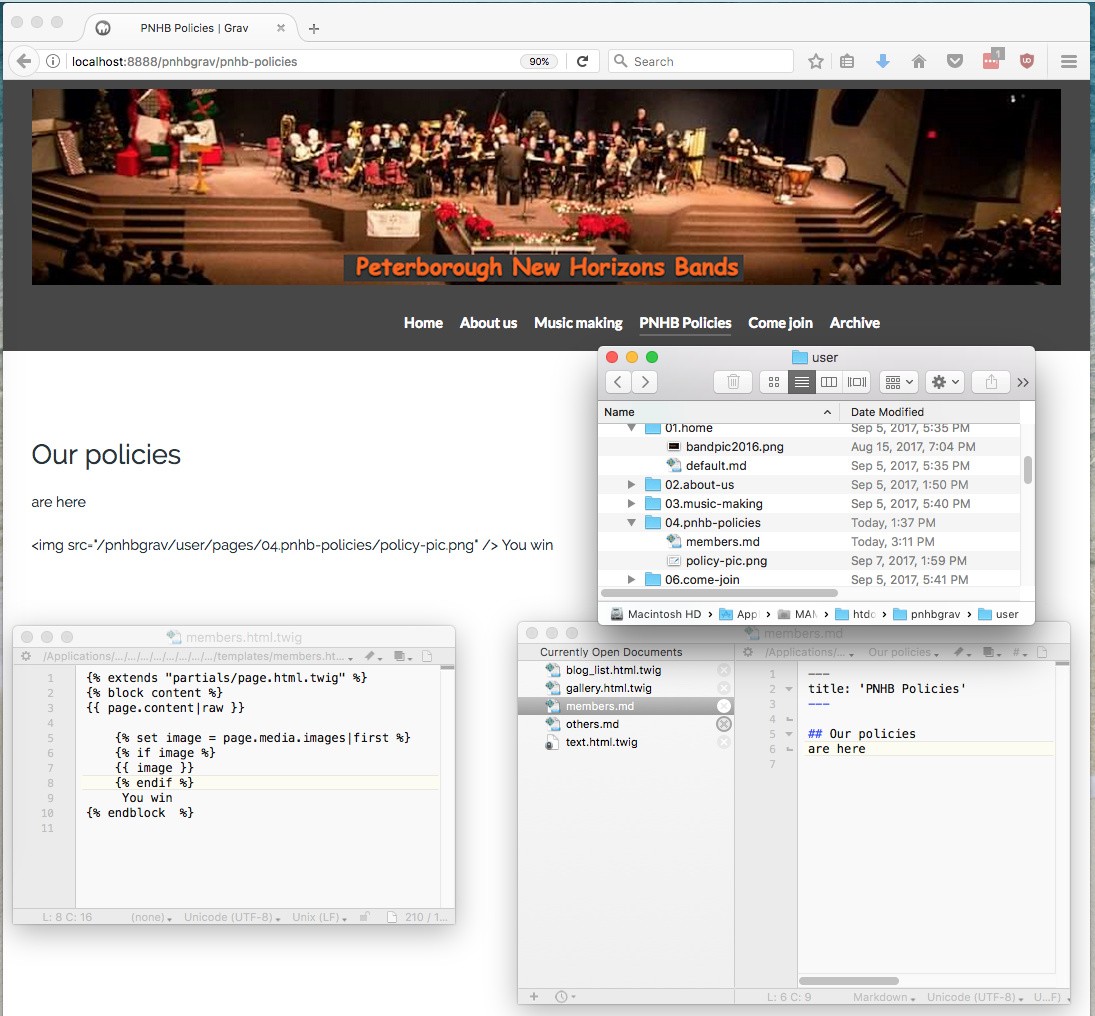
Hello,
try this:
TWIG
{{ image|raw }}
Maybe this could do the trick. ;)
Regards,
Michael
Update: Short explanation! It looks like your html code of the image is escaped by twig. That means he doesn't process the given html. Instead he translates the hmtl-code into browser friendly text ;P.
Gee thanks, that works? Where in the manual did I miss that?
Now I just have to convince the image to go in the top left where I want it:)
Norma
Top left should be no problem. Just place your code for the image above {{ page.content|raw}} .
If it's still not the way you want it, you need to work with Css and add a class du your twig variable.
Here is an example from the docs.
TWIG
{{ page.media['sample-image.jpg'].html('My
title', 'Some ALT text', 'myclass') }}
last edited 09/10/17 by Michael Gollmer
Thanks, but I have yet to write a single line of twig that did what I wanted.
I am trying to modify blog_list to put out headings ahead of certain pages.
But I need to know whether a "child" is the first in its "row" and I can find no way that works of finding this. In an archive I found a reference to collection.first or index but it does not seem to work. The manual only gives md for getting first.
Here is the code snippet
{% for row in collection | batch(page.header.content.columns) %}
{% for child in row %}
child {{child.title}} heading {{child.header.heading}} first {{row.first}} index {{row.index}}
{% if child.header.heading %}
{% if not row.first %}
</div>
{% endif %}
<h2> {{child.header.heading}} </h2>
{% endif %}
<div class="list-blog-row">
{% include 'partials/blog_item.html.twig' with {'blog': page, 'page': child, 'truncate': true, 'show_date': page.header.content.show_date} %}
{% endfor %}
</div>
{% endfor %}
The third line "prints" nothing for either first or index for any of the pages, so none of the logic has a chance!
Am I missing something really obvious?
Thanks
Norma
first is a filter, so it should be used like row|first
for index, did you mean {{loop.index}} ?
What are you trying to do with row|first inside this loop?
Thanks, that helps a bit. In general, I find the grav docs very difficult to deal with - not enough examples for newcomers.
I am trying to output a list of lists. I had a version that just looped over the lists, but unfortunately found no way of stopping my page header repeating with each list. So, I tried to modify blog_list.html.twig.
I need to ouput a heading before the next list starts.
for that, I wanted to write some simple code like
For child in whatever
if child is not the last one
if next child has "heading" in its frontmatter
Put out a heading before processing the child
some complications to deal with remaining children
and some complications about whether to output a div
...
To code in any reasonable way, I need to access next child and the loop index and maybe test for last child
I got no further than trying to print my guesses as to how I might access any of these
The docs go into great detail of how to access first, next, ... in md but say nothing about twig.
The twig docs offer row.first
For the moment I have some very ugly code that more or less does what I need to do for now.
I do not understand what {{content|raw}} does.
What about checking for loop index ?
TWIG
{% for child in page.header.yourlist %}
{% if loop.first %} {# will give true if first #}
{{ child.heading }}
{{ child.mydata }}
{% else %}
{{ child.mydata }}
{% endif %}
{% endfor %}
Thanks. That helps - I misinterpreted loop.index as needing “loop” to be replaced by the loop variable.
Am I right in guessing that child|next.content.heading might yield the test I need to see if the next child has a heading?
Norma
I'm not sure, but I think .next might only work on an array of children in a collection, but give it a try!
Not sure why you want to check the next one though, you could use loop.last or other conditions to output a div or not. no?
Log in to reply.
Suggested topics
| Topic | Participants | Replies | Views | Activity |
|---|---|---|---|---|
| 6 | 137 | 12 hours ago | ||
| 2 | 99 | 2 days ago | ||
| 0 | 50 | 3 days ago | ||
| 2 | 91 | 3 days ago | ||
| 1 | 142 | 3 days ago |