Skip to content
Grav 2.0 is officially stable. Read the announcement →

Community guidelines

Please keep discussions civil and on-topic. Repeated violations may lead to a temporary ban.

Support

Unable to update admin plugin

plugins

Solved by Duc View solution

Started by Duc 2 years ago · 2 replies · 303 views
2 years ago

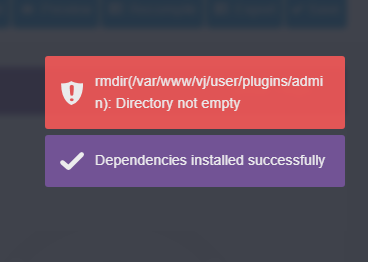
I am trying to update the admin plugin, but getting this error. Not sure how to solve this.
2024-03-21_07-09-54|368x262

my folder permissions:

TXT
drwxrwxr-x 22 ser www-data 4096 Feb 8 16:31 .
drwxrwxr-x 10 ser www-data 4096 Jan 13 15:31 ..
drwxr-xr-x 12 ser www-data 4096 Jan 18 19:14 admin
drwxrwxr-x 5 ser www-data 4096 Jan 13 15:30 archives
drwxrwxr-x 4 ser www-data 4096 Jan 13 15:30 comments
drwxrwxr-x 2 ser www-data 4096 Jan 13 15:30 count-views
drwxrwxr-x 6 ser www-data 4096 Jan 13 15:30 email

last edited 03/20/24 by Duc
2 years ago

From what you posted, this looks odd, but you haven't really posted much! It looks like you know how to use a command line, have you tried the bin/gpm update admin command? It will probably give the same result, but might be useful.

Please read and follow the new forum guidelines before replying. The regulars here are quite tired of slow guessing games teasing relevant details out of forum posters.

(Also, for search indexers and vision impaired readers, the screenshot provided in this post shows two message flashes on the poster's screen:

[red background, error icon] rmdir(/var/www/vj/user/plugins/admin): Directory not empty
[purple background, check icon] Dependencies installed successfully
)

2 years ago Solution

The screen shot is what popped up for a brief moment when I tried to update the plugin via the dashboard. This was from the log when I tried several times to update the plugin.

TXT
March 21st at 7:27am    WARNING Plugin 'admin' enabled but not found! Try clearing cache with `bin/grav clearcache`
March 21st at 7:24am    WARNING Plugin 'admin' enabled but not found! Try clearing cache with `bin/grav clearcache`
March 21st at 7:23am    WARNING Plugin 'admin' enabled but not found! Try clearing cache with `bin/grav clearcache`
March 21st at 7:22am    WARNING Plugin 'admin' enabled but not found! Try clearing cache with `bin/grav clearcache`
March 21st at 7:21am    WARNING Plugin 'admin' enabled but not found! Try clearing cache with `bin/grav clearcache`

I have tried the cli method and it works. Was able to update the admin plugin with no issue. Just the dashboard method was throwing an error. I was able to update the the core via the dashboard with no issue though.

Suggested topics

Topic Participants Replies Views Activity
Support · by Thomas, 1 week ago
2 56 13 hours ago
Support · by Anna, 3 days ago
2 61 16 hours ago
Support · by Justin Young, 17 hours ago
1 32 17 hours ago
Support · by Duc , 1 week ago
2 66 5 days ago
Support · by Colin Hume, 1 week ago
2 59 5 days ago