Skip to content
Grav 2.0 is officially stable. Read the announcement →

Community guidelines

Please keep discussions civil and on-topic. Repeated violations may lead to a temporary ban.

Support

Upload JavaScript media

Solved by ramazan View solution

Started by ramazan 5 years ago · 13 replies · 1091 views
5 years ago

Hi,

I'm currently experincing errors when trying to upload .js files to Grav.

I've some major experience in the platform and have added support for media in over 20 different program types but JavaScript seems to be the one not working well for me,

Could you please help me out?

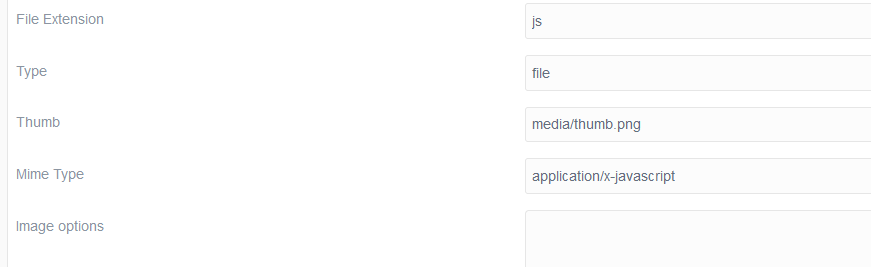
I've tried the following MIME types:

  • application/javascript
  • text/html
  • text/javascript
  • application/octet-stream

Here's how it looks,
image|690x258

Warm regards

5 years ago

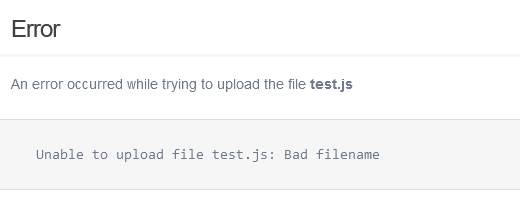
As I am a 'New' user I was forbidden to add a second picture, but here is the error I receive

image|520x211

5 years ago

Hi @ramazan ,

2 thoughts come to mind, first give the file a more specific name, just to see if it fails because it is called "test.js"

Have you tried to set the mime type to application/javascript

Let us know on either a success or still a failure :)

5 years ago

@ramazan:
I’ve tried the following MIME types:

TXT
application/javascript
text/html
text/javascript
application/octet-stream

Hi Spamhater,
Thank you for such a quick reply. As mentioned above, I have tried the following MIME types + the parameters inside my picture.

I have also tried renaming the file multiple times, it doesn't seem to work 😕

5 years ago

Hi @ramazan

Sorry I did miss the listed attempts (sorry my bag)

Can you explain a bit more of what theme / blueprint setup that you are using to create your upload, is this in the frontend or backend.

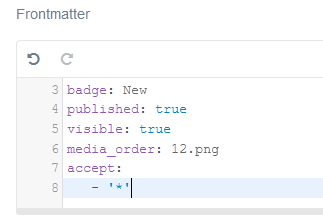
Does it work if you if you accept a file / allow any file:

TXT
accept:
   - '*'

Then trying to lock it down afterwards

I think is to see if you can see the upload in the temporary directory or if it fails after hitting the save button.

Regards

I can try and emulate your setup and see if I can see any issue from there.

last edited 07/02/21 by Spam Hater
5 years ago

Hi,

It is for the frontend, we're trying to add a JavaScript file to one of our documentation pages where the user should be able to download it. As soon as I try to upload any .js file it gives the me error.

As for the suggestion you sent, am I supposed to put it on the page in expert mode like this? If so it doesn't work..
image|323x217

5 years ago

Hi , ok, sorry I have to go on site now... but will try and have a look at it over the weeekend, time permitting.

I will try and set it up with a fresh grav and quark template and see if it return the same results and then check for errors. So bare with ... and will try and get you my findings to you asap.

👍 1
5 years ago

@ramazan, Just curious... Why would one allow visitors to download js files from documentation pages? I've never seen that before.

It is more common to show code snippets in the documentation and allow visitors to copy the snippet.

I think I would be reluctant to download a js file and would prefer to copy the snippet. I would prefer to see the code from stackblitz, jsbin, or what have you, embedded in the documentation.

Just my two cents...

👍 1
5 years ago

@pamtbaau:
It is more common to show code snippets in the documentation and allow visitors to copy the snippet.

I appreciate your suggestions

Yes, that is relevant for the most cases as we're going for that approach everywhere. For this, we'd prefer to have the file there as the code is very very long.
5 years ago

Can I ask what your server configuration is (apache / php) maybe it is being limited by that.

https://developer.mozilla.org/en-US/docs/Learn/Server-side/Configuring_server_MIME_types

also this was an interesting read

https://stackoverflow.com/questions/3749231/download-file-using-javascript-jquery

Also this was posted on the group as well

/forum/support/solved-offer-exe-files-for-download-t4047

I wondering if you many need a custom plugin, to create a page header output for the file

https://stackoverflow.com/questions/60025673/download-js-file-with-php

I will admit, i thought originally it was for upload, not for download. 😦

Maybe look at javascript function like this

https://ourcodeworld.com/articles/read/189/how-to-create-a-file-and-generate-a-download-with-javascript-in-the-browser-without-a-server

Also from the grav github , could put you in the right direction

Dangerous extension .js includes .json · Issue #3060 · getgrav/grav · GitHub

👍 1
last edited 07/02/21 by Spam Hater
5 years ago

@ramazan, A bit of digging got me to the same Github issue as mentioned by @spamhater, but thought it would be good to lift it out for clarity.

In short:
Admin checks for file extensions and refuses to upload files with file extentions mentioned in /system/config/security.yaml:

YAML
uploads_dangerous_extensions:
    - php
    - html
    - htm
    - js
    - exe

Obvious thing to do next is to comment out the 'js' line, but that leads to the next error:

The mime type does not match to file extension

The same error is mentioned in Github issue: My zip-files aren't zip-files anymore – says the page-media-upload.

I've added a comment noting that *.js produces the same issue.

👍 1
last edited 07/03/21 by pamtbaau
5 years ago

Hi Guys,

Super thankful for your advice and help. Sadly I was on a vacation the past week so I couldn't test the suggestions.

But you managed to solve it for me. Thank you so much.

For future reference, my issue was solved when I used the MIME type: application/x-javascriptt together with the things mentioned above

last edited 07/12/21 by ramazan
5 years ago

@ramazan, Would you mind being a bit more precise then:

together with the things mentioned above

  • Your solution would be more valuable to other community members if more complete
  • I would like to add the exact solution to the comment on Github.
5 years ago Solution

Yes. I took the following steps:

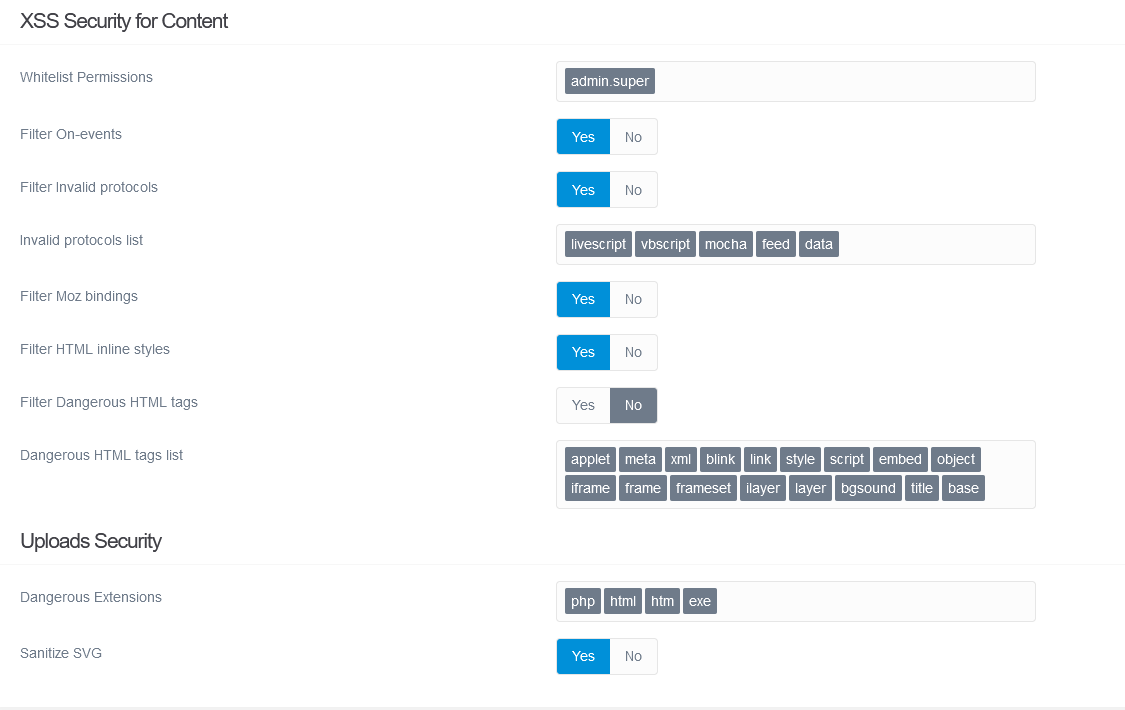
  1. Went to Configuration -> security.yaml
  2. Removed Javascript from "Invalid protocols list"
  3. Removed JS from "Dangerous Extensions" as seen in the picture down below:

    image|690x435

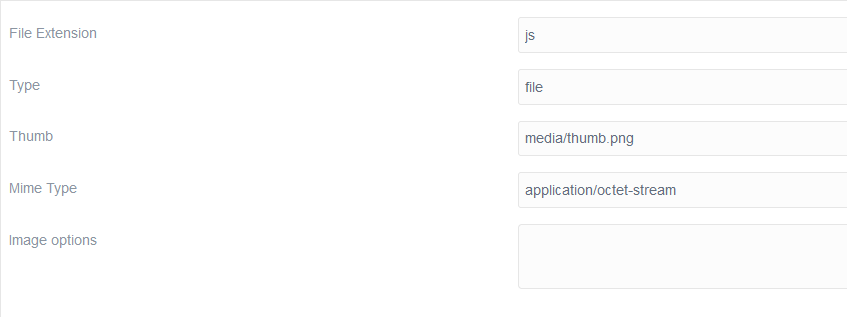
  4. Once done I went to media.yaml and added the following:

    image|690x211

Please let me know if something is unclear

last edited 07/12/21 by pamtbaau

Suggested topics

Topic Participants Replies Views Activity
Support · by Thomas, 1 week ago
2 51 8 hours ago
Support · by Anna, 2 days ago
2 58 11 hours ago
Support · by Justin Young, 12 hours ago
1 30 11 hours ago
Support · by Duc , 1 week ago
2 63 5 days ago
Support · by Colin Hume, 1 week ago
2 55 5 days ago