Skip to content
Grav 2.0 is officially stable. Read the announcement →

Community guidelines

Please keep discussions civil and on-topic. Repeated violations may lead to a temporary ban.

Support

URL Redirects not working!

Solved by pamtbaau View solution

Started by Sarah L 6 years ago · 5 replies · 1111 views
6 years ago

Hey,

I've been trying to fix an issue with redirects not working and can't figure it out, a fresh pair of eyes would be much appreciated.

I moved by blog a few years ago to Grav and some URLs changed, and I had redirects set up to send people to the new URL.

But the redirects no longer seem to be working.

I have the redirects set up in system/config/site.yaml
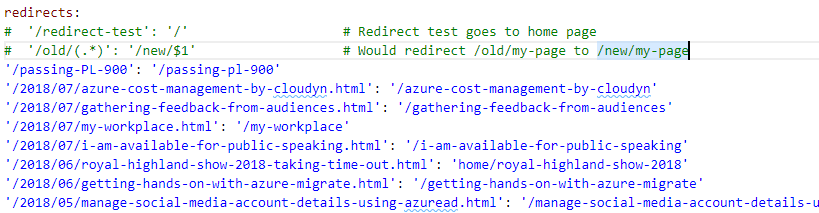
redirects|690x179

What am I doing wrong?

6 years ago

If I were you I would set the redirects in the Grav .htaccess file.

6 years ago

@bleutzinn, I'm curious why... Would you mind sharing some arguments?

6 years ago Solution

@techielass, I'm missing the indentation in the image you are sharing.

In my default Grav 1.6.26 install:

Failing: Error 404

TXT
redirects:
'/xxx': '/typography'    <-- no indentation

Working:

TXT
redirects:
  '/xxx': '/typography'  <-- with indentation
👍 1
last edited 08/19/20 by pamtbaau
6 years ago

That worked, thank you! I knew a second pair of eyes out notice the issue. Thanks.

6 years ago

Some time ago I had problems with custom routes and redirects. They simply didn’t work.

Later the probable cause was in that I was also using a custom slug in the page frontmatter. Somehow this confused Grav. But by then I had already switched to doing redirects before Grav comes into play. Just to avoid complications.

Suggested topics

Topic Participants Replies Views Activity
Support · by Thomas, 1 week ago
2 53 9 hours ago
Support · by Anna, 3 days ago
2 59 12 hours ago
Support · by Justin Young, 13 hours ago
1 30 13 hours ago
Support · by Duc , 1 week ago
2 65 5 days ago
Support · by Colin Hume, 1 week ago
2 56 5 days ago