Skip to content
Grav 2.0 is officially stable. Read the announcement →

Community guidelines

Please keep discussions civil and on-topic. Repeated violations may lead to a temporary ban.

Support

Weird page name bug

Solved by Pierre Causse View solution

Started by Pierre Causse 5 years ago · 11 replies · 402 views
5 years ago

Hello !

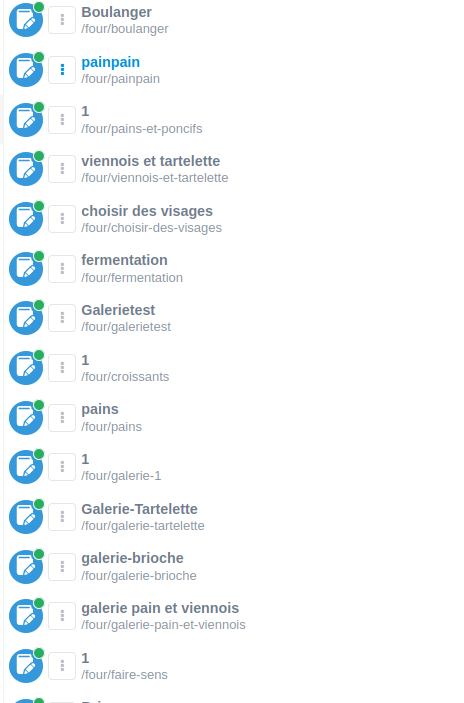
Since few days, all pages with a certain template are automatically named "1" in my admin panel.

image|330x500

I don't know what I've done, and I don't see real differences in my yaml template between the buggy one and others.

Is anyone know where this comes from ?

5 years ago

Probably from the pages' frontmatter (template.md)

YAML
title: 1
5 years ago

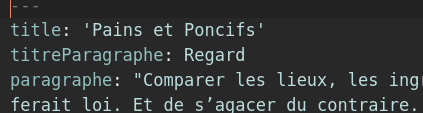
Hey thanks for the answer. You mean the .md of the page ? There's a title entry, and its not "1" : /

image|423x113

5 years ago

Weird then. Does this page template come from some plugin? Did you update plugins recently?

5 years ago

Nope : / It's a grav fresh install. Only plugin I added was TinyPng, but after turning it off it doesn't change anything. Plus, the plugin is not supposed to interact with templates.

5 years ago

If it's a fresh install, I assume it's one of the default Grav/Quark templates, correct?

5 years ago

No I created a new template with devtools... I feel like I'm missing a really obvious thing... 😑

5 years ago

@edi0th,

I feel like I’m missing a really obvious thing…

So do we, because you're not sharing much....

To prevent any confusion: One cannot create a "template" with DevTools. Only themes/plugins/blueprints can be created.

When creating a theme, one can choose between 'pure-blank', 'tailwind', 'inheritance' and 'copy'. A newly created theme may contain some simple "Twig templates" in folder '/templates'.

Would you mind sharing which exact steps you have taken starting from a scratch Grav 1.7.18 install allowing use to reproduce the issue?

5 years ago

@pamtbaau:
So do we, because you’re not sharing much…

Sorry ! I'm a bit new to Grav, so i'm not sure what to share. 😓 At first I though that maybe I was a known issue, but it seems not.

If I remember well, I use devtool and chose the pure-blank theme. I named it the way I wanted, then, I erased all default blueprints and make mine.

Here is the full code of the buggy blueprint :

YAML
title: Paragraphe

form:
  fields:
    tabs:
      type: tabs
      active: 1

      fields:
        content:
          type: tab

          fields:

            header.titreParagraphe:
              type: text
              label: Titre Paragraphe

            header.paragraphe:
              type: editor
              label: Paragraphe

            header.centrage:
              type: toggle
              toggleable: true
              label: "Centrer texte"
              highlight: 1
              default: 0
              options:
                1: Yes
                0: No
              validate:
                type: bool

            header.menu:
              type: toggle
              toggleable: true
              label: "Insérer dans le menu"
              highlight: 1
              default: 0
              options:
                1: Yes
                0: No
              validate:
                type: bool

            header.titremenu:
              type: text
              label: Titre Menu

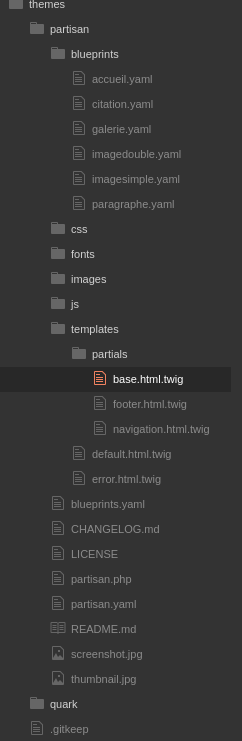
And an image of the structure of the theme "Partisan" I made :
image|163x500

There's no .html.twig template associate with blueprint because it's a one-pager and all is happening in the default.html.twig

Here's is the complete .md of a page that display the "1" title:

YAML
---
title: 'Pains et Poncifs'
titreParagraphe: Regard
paragraphe: "Comparer [blablabla cuted text blablabla] subjective."
menu: true
titremenu: Regard
---

What can I share that would also help ?

Thanks everyone for taking time for this issue :no_mouth:
5 years ago

@pamtbaau:
Would you mind sharing which exact steps you have taken starting from a scratch Grav 1.7.18 install allowing use to reproduce the issue?

Thing is, those "1" titles did not appeared right in the begining. I think I must have done something after, but it's hard to trace back exactly all what I did. I'm going to investigate more.

5 years ago Solution

@edi0th:
Is a generic name taken by the admin interface ?

It was. Or I guess. I changed

TXT
header.menu:

by

TXT
header.appearancemenu:

And the "1" was gone.

But out of curiousity, why did this happened exactly ?

last edited 08/10/21 by Pierre Causse
5 years ago

@edi0th, Just an educated guess...

The 'Pages' page In Admin lists all pages by their 'Menu' name as set in the header of the page like:

YAML
---
menu: Typography
---

Blueprint field header.menu defines the menu variable in the frontmatter of the page.

Since your blueprint uses the Grav reserved header.menu for a boolean (using 1 and 0 as values), Grav will happily take that value as the name for the menu. And Admin will happily use that value in its list of pages.

👍 1
last edited 08/12/21 by pamtbaau

Suggested topics

Topic Participants Replies Views Activity
Support · by Thomas, 1 week ago
2 55 12 hours ago
Support · by Anna, 3 days ago
2 60 15 hours ago
Support · by Justin Young, 16 hours ago
1 31 16 hours ago
Support · by Duc , 1 week ago
2 65 5 days ago
Support · by Colin Hume, 1 week ago
2 58 5 days ago