Skip to content
Grav 2.0 is officially stable. Read the announcement →

Community guidelines

Please keep discussions civil and on-topic. Repeated violations may lead to a temporary ban.

Themes & Styling

Display both created & modified dates for a post in a blog

Solved by Ole Vik View solution

Started by Viharm 3 years ago · 4 replies · 610 views
3 years ago

Hi, I've recently discovered Grav, and am seriously thinking about migrating my blog to it. In doing so, I'm also keen to improve on existing features.

I am trying to achieve a layout where the reader can see two dates

  1. The date when the post was first published (I'm happy to put this down manually)
  2. The date when the post was last modified.

I have searched and found the last_modified configuration setting in system.yaml, however it simply switches the date of the post from created to modified, <u>but not both</u>.

Here is an example of such a post on Lea's blog which shows the edited date separately. She has used a combination of Eleventy and a few other things.

I am trying to avoid having to edit the code of the theme, as I'd like this layout to be portable.

Has anyone done this before? How can I achieve this?

last edited 08/27/23 by Viharm
3 years ago

Would you consider putting both down manually? I find this a better practice than relying on the underlying system for ascertaining it from times in the filesystem, as those can be overwritten when I need to nuke and pave or move data. Eg:

YAML
date: 15-05-2016
updated: 18-05-2016

Are declarative dates for when originally written, and when last substantially changed. I often separate between Semantic and Calendar versioning for code and content, respectively.

Whereby I would update the date-metadata for any major change in content that I deem changes the very nature of it, but only the updated-metadata for any actual changes such as revisions, additions, or depreciations. Markedly, I would not want either date to change when I fix a typo, comma, or link.

3 years ago

Thanks @OleVik for your prompt response.

Yes, I agree with your approach - especially your comment about fixing typos, as dates of minor fixes can be very misleading to readers. In fact this is better practice than relying in filesystem metadata. I intend to revise our editing workflow to ensure that the authors hardcode the dates in the frontmatter.

However is the updated property an official part of the frontmatter semantic? I tried it, but the rendered page only shows one date - the value of the date property.

What am I doing wrong?

3 years ago Solution

The FrontMatter-semantics are quite flexible, and really very few things are actually tied into Grav's core, mainly date and published. Most of its functionality is actually governed by the theme, where you would add something like:

TWIG
<p>
  <time datetime="{{ page.date|date('c') }}">
    {{ page.date|date("Y-m-d") }}
  </time>
  {% if page.header.updated %}
    , <time datetime="{{ page.header.updated|date('c') }}">
      {{ page.header.updated|date("Y-m-d") }}
    </time>
  {% endif %}
</p>

To illustrate both.

👍 1
3 years ago

Totally understand, thanks very much for patiently taking me through such basic stuff.

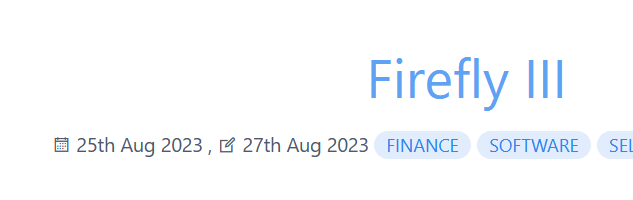
It works exactly as expected now

Example of an edited page...
image|633x200

I can't paste a second image because I'm still new to the forums, but an unedited page simply ignores the updated date and the comma before it, just like the logic you posted.

Both are manually controlled through the frontmatter.

Thanks.

👍 1

Suggested topics

Topic Participants Replies Views Activity
Themes & Styling · by Pedro M, 2 months ago
4 195 2 months ago
Themes & Styling · by Ian, 2 months ago
3 91 2 months ago
Themes & Styling · by Norbert, 2 years ago
11 451 3 months ago
Themes & Styling · by Lukáš Findeis, 3 months ago
0 45 3 months ago
Themes & Styling · by Sebadamus, 4 months ago
5 125 3 months ago