Skip to content
Grav 2.0 is officially stable. Read the announcement →

Community guidelines

Please keep discussions civil and on-topic. Repeated violations may lead to a temporary ban.

Content & Markdown

How to call snippets in image alt and title in twig template

Started by Roeland 8 years ago · 6 replies · 2237 views
8 years ago

I want to use a snippet inside a twig template that corresponds with it's modular block (.md)

So im using the x-corporation theme, i setup a banner block with 2 responsive banners, i call the banner images through my twig template, everything works fine but the output for the alt and title text needs to be dynamic (hense using a snippet corresponding to the input in the modular .md file).

My snippet (i tried several inputs for alt and title tags):
{{ page.media.images[banner.image].html(’{{ banner.title }}’, ‘{{ banner.title }}’, ‘home-banner’) }}

Html output:

img|690x13

There are several topics on this but none are closed/solved.

last edited 12/18/18 by Roeland
8 years ago

@aristotletalks I suggested in our PM to remove the curly braces around banner.title. But that appears not to work...

Would you mind sharing the definition of 'banner'?

8 years ago

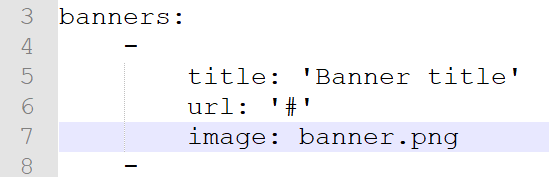
Banner is the content (title, description, url) defined in the module banners.en.md >>
ban|549x177

8 years ago

@aristotletalks I'm not using 'x-corporate' but instead use a theme inheriting from Quark.

I tried to mimic your template and page definitions as you mailed me as close as possible.

  • I created the template '/users/themes/mytheme/templates/modular/banner.html.twig' containing:

    TWIG
    {% extends 'partials/base.html.twig' %}
    
    {% block body %}
      {% for banner in page.header.banners %}
          <a href="{{ banner.url }}">
              {{ page.media.images[banner.image].html('', banner.title) }}
          </a>
      {% endfor %}
    {% endblock %}
    
  • I create a page ''user/pages/01.home/05._banner/banner.md' containing:
    YAML
    ---
    title: Banner
    banners:
    -
        title: 'Start met balans in je leven'
        url: '#'
        image: header.jpg
    -
        title: 'Aan de slag'
        url: '#'
        image: header.jpg
    ---
    # My banner page
    
  • It resulted in the following html:
    HTML
    <a href="#">
      <img alt="Start met balans in je leven" src="/site-modular/user/pages/01.home/05._banner/header.jpg">
    </a>
    <a href="#">
      <img alt="Aan de slag" src="/site-modular/user/pages/01.home/05._banner/header.jpg">
    </a>
    

This seems to be what you are looking for. Would you mind trying the same code your site?

👍 1
8 years ago

Ergh.. i gave you the wrong code, this code gives me the title and alt tags:

TWIG
{{ page.media.images[banner.image].html('{{ banner.title }}', '{{ banner.title }}', 

So adding your snippet, works, but it didn't give me a class, so this is the snippet i used:
{{ page.media.images[banner.image].html('', banner.title, 'home-banner') }}
Result:
image|690x18

But now i want to add two more tags:

  • title tag
  • aria-describedby

How to proceed?

8 years ago

@aristotletalks Luckily there are more ways... The good old 'manual' way...

TWIG
<a href="{{ banner.url }}">
    {# {{ page.media.images[banner.image].html('', banner.title) }} #}
    <img src="{{ page.media[banner.image].url }}"
         title="{{ banner.title }}"
         alt="{{ 'variable-containing-alt' }}"
         class="home-banner"
         aria-describedby="{{ 'variable-containing-aria-describedby' }}">
</a>
last edited 12/19/18 by pamtbaau
7 years ago

@aristotletalks Just wondering if you have been successful with setting the attributes 'alt', 'title' and custom 'aria-describedby' during image creating...

Suggested topics

Topic Participants Replies Views Activity
Content & Markdown · by Jochen, 8 months ago
6 97 8 months ago
Content & Markdown · by Ton Haarmans, 1 year ago
10 185 1 year ago
Content & Markdown · by Jan L'Am, 1 year ago
4 148 1 year ago
Content & Markdown · by Leonardo, 1 year ago
3 61 1 year ago
Content & Markdown · by belthasar, 1 year ago
4 255 1 year ago
