Skip to content
Grav 2.0 is officially stable. Read the announcement →

Community guidelines

Please keep discussions civil and on-topic. Repeated violations may lead to a temporary ban.

Content & Markdown

Problem with displaying content on modular page

first-time

Started by Oona O'Neil 9 years ago · 8 replies · 2728 views
9 years ago

Hello, I'm new here. I'm trying to create a modular one-page website with Grav, but without using Administration Panel.
I got to the point when my layout is displayed (I've copied it from another website I've created), but still struggling to see the content.

I've noticed some other people had a similar issue, but haven't found any solution explaining how to do it without using the Admin Panel. Could you explain me how to refer to the .md file in the .html.twig one?

Here's an example of my .md file:

YAML
    title: Call to Action
    anchor: call-to-action
    showcase:
            sup: 'Lorem ipsum dolor sit amet'
            heading: 'Lorem ipsum dolor sit amet'
            text: 'Lorem ipsum dolor sit amet, consectetur adipiscing elit, sed do eiusmod tempor incididunt ut labore et dolore magna aliqua. Lorem ipsum dolor sit amet, consectetur adipiscing elit, sed do eiusmod tempor incididunt ut labore et dolore magna aliqua.'
            button1: 'Lorem'
            button2: 'Ipsum'
    ---

Any advice welcome!

last edited 11/09/17 by Oona O'Neil
9 years ago

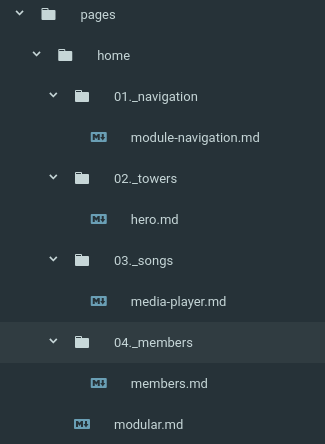
The folder names match the page title. The .md files just need to correspond to a twig and yaml file with the same name.

modular.md would correspond to modular.html.twig and modular.yaml, hero.md would correspond to hero.html.twig and hero.yaml, etc.

Here is the page structure I have on one of my sites that is a modular, one page, site.

image|325x444

Hope that helps!

9 years ago

@bbricker87, thanks for your reply. However, I got that bit right.

I have my structure in .html.twig and content in .md. Structure is displaying correctly, but content is not.

For example (continuation of the example in the post), how to make sure the text on these buttons displays correctly?

TWIG
<a href=""><button type="button" class="button_bright">{{ item.button1 }}</button></a>
<a href=""><button type="button" class="button_dark">{{ item.button2 }}</button></a>
9 years ago

Oh I see now. Try page.header instead of item. If that doesn't work, what do your md and twig files look like?

{{ page.header.button1 }}
{{ page.header.button2 }}

9 years ago

@bbricker87 I'm afraid that it doesn't work. You can see my .md file in the main post.

As for .html.twig, here's everything:

HTML
<div class="calltoaction">
    <div class="container2">
        {{ content }}
            <h2 class="heading--no-margin"></h2>
            <h1 class="heading--uppercase heading--bold">{{ item.heading }}</h1>
            <p>{{ item.text }}</p>
            <a href=""><button type="button" class="button_bright">{{ page.header.button1 }}</button></a>
            <a href=""><button type="button" class="button_dark">{{ page.header.button2 }}</button></a>
    </div>
</div>
9 years ago

Is this for the page that holds all of the modular pages or one of the modular pages?

9 years ago

Thats one for the modular templates. The page which holds of all the them is working fine as I can display the titles of all of them with {{ module.title }}, just no content is rendered with {{ module.content }} (I mean, no text.). Hope that helps.

9 years ago

I'm not sure what is going on. I'll give you some of my code and see if that helps.

Here is what my main modular page looks like.

TWIG
{% extends 'partials/base.html.twig' %}

{% block content %}
    {{ page.content }}
    {% for module in page.collection() %}
        {{ module.content }}
    {% endfor %}
{% endblock %}

and part of the twig file on one of my modular pages.

TWIG
<div class='hero__text'>
    {% if page.header.heroTitle %}
        <h1 class='hero__text__title'>{{page.header.heroTitle}}</h1>
    {% endif %}
    {% if page.header.heroSubtitle %}
        <h3 class='hero__text__blurb'>{{page.header.heroSubtitle}}</h3>
    {% endif %}
</div>

and page markdown for file

YAML
---
heroTitle: 'Big Title Over Hero'
heroSubtitle: 'Lorem ipsum dolor sit amet, consectetur adipiscing elit, sed do eiusmod tempor incididunt ut labore et dolore magna aliqua.'
title: Hero Title
---
👍 1
9 years ago

OK. It's finally working. I've removed 'showcase:' from my .md file. I guess I was just overcomplicating with unnecessary nesting. Thanks for help!

👍 1

Suggested topics

Topic Participants Replies Views Activity
Content & Markdown · by Jochen, 8 months ago
6 93 8 months ago
Content & Markdown · by Ton Haarmans, 1 year ago
10 184 1 year ago
Content & Markdown · by Jan L'Am, 1 year ago
4 145 1 year ago
Content & Markdown · by Leonardo, 1 year ago
3 58 1 year ago
Content & Markdown · by belthasar, 1 year ago
4 253 1 year ago