Skip to content
Grav 2.0 is officially stable. Read the announcement →

Community guidelines

Please keep discussions civil and on-topic. Repeated violations may lead to a temporary ban.

Content & Markdown

Resize picture in table

Solved by pamtbaau View solution

Started by Plumf 6 years ago · 6 replies · 3862 views
6 years ago

Hi people, for an project we build our documentation with grav and learn theme. Actually we have table in html and pictures resize.
After test, picture resize it's good with a markodwn code in paragraph but don't work in table.

  • Two questions, it's possible to resize picture in table ?
  • If yes, it's same markdown code ?

For information I use this part of documentation

One of the main benefits of using images associated with pages is that it enables you to >take advantage of Grav's powerful media actions. For example, here is a line you would use to >load an image from another page:

TXT
![Styling Example](../test-post-3/test-image-3.jpg?cropResize=400,200)

Thank or you answer @Plumf

6 years ago Solution

@Plumf, According the inventor of Markdown:

Note that Markdown formatting syntax is not processed within block-level HTML tags. E.g., you can’t use Markdown-style *emphasis* inside an HTML block.
[...]
Unlike block-level HTML tags, Markdown syntax is processed within span-level tags.

This can be resolved using Markdown Extra which is available in Grav. Try the following:

  • Enable Markdown Extra in '/user/config/system.yaml':
    YAML
    pages:
    theme: mytheme
    markdown:
     extra: true  // Enable Markdown Extra
    
  • And in your markdown use:

    HTML
    <div markdown="1">
    This is **bold** text inside div.
    </div>
    
    <table>
    <tr>
    <td markdown="1">
    This is **bold** text inside table cell.
    </td>
    </tr>
    </table> 
    

    Note: It will not work if you indent the elements inside the table.

Hope this helps...

6 years ago

Thank @pamtbaau, I didn't specify, but the whole picture is in Markodwn. I just wanted to avoid pieces of html. I don't know if that changes the answer?

6 years ago

@Plumf, I'm afraid I don't understand your remark. Have your tested my suggestion?

6 years ago

Yes it's good solution. But I redact my table in markdown like this :

TXT
|----|----|----|
|:--:|:--:|:--:| 

With your solution, I do redact table with html. But now it's transformed =)

Thanks for all

6 years ago

@Plumf, Thanks for the clarification. I have tried a table in Markdown markup...

I copied a random table from a cheat sheet and added an image as follows:

TXT
| Tables        | Are           | Cool  |
| ------------- |:-------------:| -----:|
| col 3 is      | right-aligned | $1600 |
| col 2 is      | centered      |   $12 |
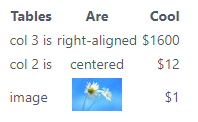
| image | ![](image.jpg?cropResize=50,50) |    $1 |

Which gives the following result:
image|198x122

So, it seems to be working... (Without Markdown Extra)

Just wondering, what exactly is not working for you?

6 years ago

I'm sorry, I try an other table. And it's good....
As I've all turned into html I don't know what was wrong. Thank for your time

Suggested topics

Topic Participants Replies Views Activity
Content & Markdown · by Jochen, 8 months ago
6 97 8 months ago
Content & Markdown · by Ton Haarmans, 1 year ago
10 185 1 year ago
Content & Markdown · by Jan L'Am, 1 year ago
4 147 1 year ago
Content & Markdown · by Leonardo, 1 year ago
3 61 1 year ago
Content & Markdown · by belthasar, 1 year ago
4 255 1 year ago