Skip to content
Grav 2.0 is officially stable. Read the announcement →
Support

How do I force correct file extension to download

Started by Karmalakas 5 years ago · 1 replies · 345 views
5 years ago

In Media config I've added CCX file
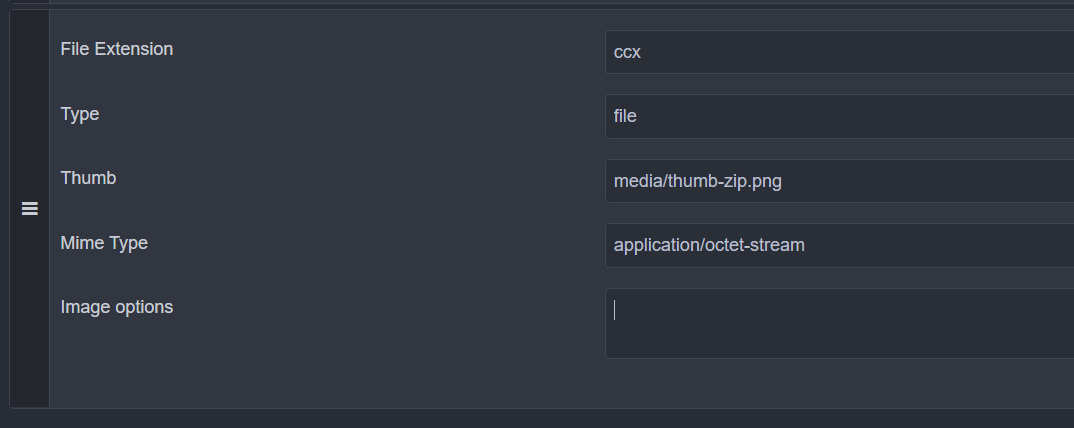
image|690x274

File is uploaded via usual mediaorder and then selected with filepicker. The URL I get is <...>.ccx, but when I click on it, browser opens to save <...>.zip

Is there a way to get to download original CCX instead of ZIP? Maybe there's something I can add to Image options?

P. S. This CCX file is actually a ZIP with different extension

5 years ago

that might be your browser, which recognizes the file is a zip, then wants to download as zip.
just like a smart OS, which looks into the first 256 bytes of the file content and then knows what it really is, regardless of extension. (linux does that, windows stupidly relies on the extension 😃 )

Suggested topics

Topic Participants Replies Views Activity
Support · by Thomas, 1 week ago
3 94 4 hours ago
Support · by Anna, 3 days ago
2 94 1 day ago
Support · by Justin Young, 1 day ago
1 64 1 day ago
Support · by Duc , 1 week ago
2 100 6 days ago
Support · by Colin Hume, 1 week ago
2 91 6 days ago