I love got Grav Documentation pulls from Github. It seems very elegant for open source content. I’d like to create something similar on my website. Is there a tutorial on how to do this?
While looking around more I found this old blog post that explains some of the steps but I think some portions are outdated, and it doesn’t address some of the unique aspects of how the documentation assembled and rendered on Lear.getgrav.org.
https://getgrav.org/blog/developing-with-github-part-1
I’d still love it if there was a tutorial on how to essentially recreate the documentation on one’s own site.
And now I find a plugin that, I think, does everything I’m trying to figure out. Maybe all I have to do is install Git Sync??
https://github.com/trilbymedia/grav-plugin-git-sync
From what I can tell the only thing I have to do is install the plugin and it’ll push my site to Github where I can manipulate and push the content back to my production site.
Is this correct?
Hi @miller.nw, yes that is right - Git Sync makes the process automatic as content changes either on the Grav site or the Git repo (if you set up the Webhook) will cause a sync. I include it in several of my Grav skeletons including Open Course Hub and Open Publishing Space.
You might also find these two Git Sync YouTube videos of help:
https://www.youtube.com/watch?v=96CqtxL7WaQ&list=PLk2Bz5X36nXBSZqb9w8x-BmxkaJwCDJkc&index=8
https://www.youtube.com/watch?v=f4QMU1WVu10&list=PLk2Bz5X36nXBSZqb9w8x-BmxkaJwCDJkc&index=9
Good luck!
Paul
The good news is IT WORKED! I have my Grav site syncing with Github and Github syncing with my local machine.. but there's one problem. No matter what I do I cannot get GitSync to see and synchronize my Template folder. In fact, the only thing I manage to sync is the Pages folder and readme.md.
Any idea on what I can do (or how I can diagnose it)?
First of all, I didn't check but I'm pretty sure I remember there's a plugin setting to sync the theme files too. It just defaults to the page folder only.
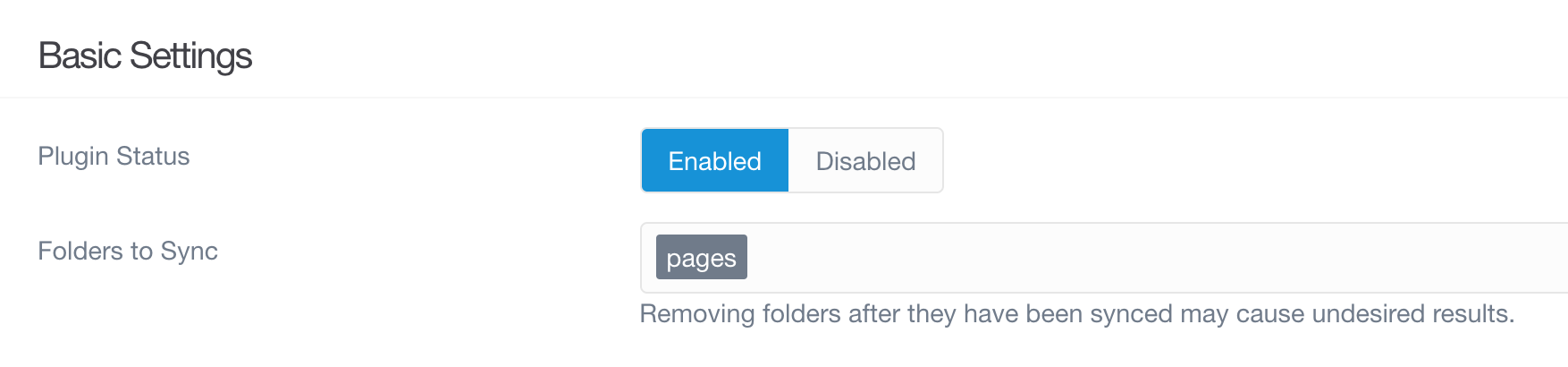
Yes, there are a couple of options that I've found. First, there are check boxes you can click during the setup wizard - it lets you choose which folders to replicate to Github. I tried those and the settings didn't take, then I tried re-running the wizard and that didn't take. Finally I uninstalled the plugin, reinstalled, and tried clicking those options again.. didn't work.
The other place I see is on the plugin settings page (see included picture). I've added "themes" to this field but to no avail. I suspect this is the area of the plugin that I need to work with, but I can't quite figure it out.. something doesn't seem right. Any ideas? Or an idea of who I should talk to?
Log in to reply.
Suggested topics
| Topic | Participants | Replies | Views | Activity |
|---|---|---|---|---|
| 4 | 115 | 3 days ago | ||
| 2 | 102 | 5 days ago | ||
| 5 | 349 | 1 week ago | ||
| 5 | 541 | 1 week ago | ||
| 6 | 336 | 3 weeks ago |